FC 27 DIFFICULTY LEVELS

FC 27 Difficulty Levels allow you to adjust the game to match your skill level.
FC 27 Difficulty Levels

Difficulty Levels


Difficulty levels are crucial for keeping players engaged, preventing boredom from easy gameplay or frustration from excessive difficulty. Achieving this balance is a key challenge for game designers.

Upon starting FC 27, players are prompted to select a difficulty level for their profile.

There are seven FC 27 difficulty levels when playing against CPU AI:

  • Beginner
    You have no experience playing FC;
  • Amateur
    You have little to no experience playing FC;
  • Semi-Pro
    You have experience playing FC and play casually;
  • Professional
    You are experienced at FC and want to be challenged;
  • World Class
    You are an expert at FC;
  • Legendary
    You are an expert at FC and want to face only the best;
  • Ultimate
    This harder level is only available in Squad Battles.

The way how each difficulty level affects the performance of AI during single-player matches is summarized below:

DifficultyAttacking
Intelligence
Defending
Intelligence
Reaction
Speed
Marking
and Space
Beginner10%10%20%15%
Amateur20%20%40%30%
Semi-Pro40%40%50%50%
Pro50%50%70%60%
World Class75%75%80%80%
Legendary90%90%90%90%
Ultimate 100%90%100%100%
Ultimate level is only available in Squad Battles

Adjusting the Difficulty Level in FC 27


You can adjust the difficulty settings in FC 27 to control how AI opponents behave. This lets you fine-tune the challenge to suit your skill level and gameplay preferences when facing the computer.

Keep in mind that the difficulty level cannot be changed once a match has started. Make sure to select a setting you are comfortable with before kicking off.

How to Change the Difficulty Level in FC 27
  1. From the main Ultimate Team screen, navigate to [Settings];
  2. Select [Game Settings];
  3. In the ‘Game Settings’ screen, press R1/RB once to go to [Match];
  4. Scroll down to [Difficulty Level];
  5. Use the directional pad or left analog stick to select your desired difficulty.
The difficulty you select affects gameplay and can only be changed on the [Game Settings] screen before a match begins.
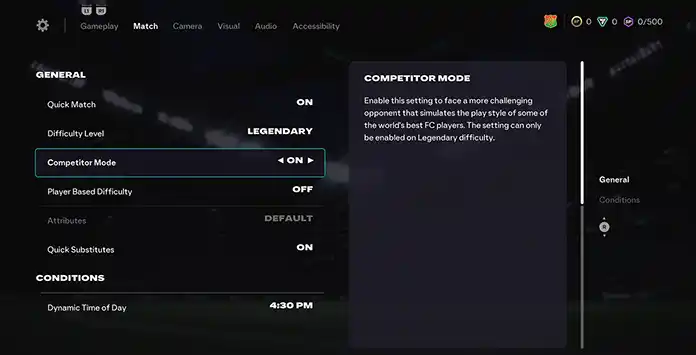
Competitor Mode

Competitor Mode


Turning on Competitor Mode makes matches more challenging by simulating the playstyle of top-tier FC players.

First introduced in FIFA 2020, this feature improves the CPU AI’s use of dribbling, spacing, skill moves, and overall tactics. The result is a more dynamic and reactive opponent that actively looks for scoring chances. You’ll notice aggressive passing, advanced skill combinations, and strategic shifts, including changes in tactics and mentality when you’re ahead.

How to Enable Competitor Mode
  1. From the main Ultimate Team screen, navigate to [Settings];
  2. Select [Game Settings];
  3. In the ‘Game Settings’ screen, press R1/RB once to go to [Match];
  4. Scroll down to [Competitor Mode];
  5. Use the directional pad or left analog stick to turn it on.
This feature is only available on Legendary or Ultimate difficulty levels.

Player Based Difficulty


ctivating the Player Based Difficulty setting causes the top players on the CPU-controlled team to display higher intelligence and sharper performance while in possession.

Introduced in FIFA/FC 2021, this feature applies difficulty on a per-player basis rather than treating the entire team the same. For example, when facing a CPU team set to professional difficulty, standout players will behave as if they’re playing on world class. On the other hand, the weaker players will perform as if set to semi-pro.

How To Enable Player Based Difficulty
  1. From the main Ultimate Team screen, navigate to [Settings];
  2. Select [Game Settings];
  3. Once in the ‘Game Settings’ screen, press R1/RB once to go to [Match];
  4. Scroll down to [Player Based Difficulty];
  5. Use the directional pad or left analog stick to turn it on.
This feature is available in all difficulties.
Frequently Asked Questions
There are seven FC 27 difficulty levels:
  • Beginner;
  • Amateur;
  • Semi-Pro;
  • Professional;
  • World Class;
  • Legendary;
  • Ultimate.
If you’ve played previous titles, it’s recommended to choose the difficulty level you’re familiar with or one step below. If this is your first FIFA/FC experience, Amateur is a good starting point unless you have experience with other football simulators. In that case, Semi-Pro may be a better fit.
You can change the difficulty level before any single-player game or in the settings screen.

  1. From the main Ultimate Team screen, navigate to [Customize];
  2. Select [Settings] and then [Game Settings];
  3. Scroll down to [Difficulty Level];
  4. Use the directional pad or left analog stick to set the difficulty to your desired level.
Most players choose Professional when playing FC 27, but World Class and Semi-Pro are also very popular.
Competitor Mode allows you to face CPU AI that mimics the play styles of some of the world’s top FC Pro players.
Yes, usually, it’s more challenging to play against the CPU AI than when this feature is not enabled.
Player Based Difficulty is a feature that sets the difficulty level for each player individually, rather than treating the entire team the same.
You cannot change the difficulty setting during a Divisions Rivals or Champions online match, since you are competing against another player. However, it can be adjusted in Squad Battles or Single-Player Draft.
Difficulty works differently in Squad Battles, as you are prompted to select your opponent’s difficulty after choosing your team. Each difficulty level offers a different points reward, with harder levels granting more points per match than easier ones.

DifficultyMatch Points
Beginner1,500
Amateur1,550
Semi-Pro1,600
Pro1,700
World Class1,800
Legendary1,900
Ultimate2,000
You need to choose your difficulty when you play a single-player Draft match. The level you select will affect the number of coins you receive at the end of the game but has no effect on your campaign rewards.
No, your rewards at the end of your Draft campaign won’t be affected by your difficulty level.
You can change the difficulty level in Career Mode the same way as in other modes, through the FC Game Settings screen. For the most authentic experience, adjust the sliders on the ‘User Gameplay Customisation’ and ‘CPU Gameplay Customisation’ screens.
0 0 votes
Article Rating
Subscribe
Notify of
guest
0 Comments
Newest
Oldest Most Voted
Inline Feedbacks
View all comments