FC 27 CAMERA
FC 27 Camera Settings allow you to customize camera types, adjust height, angles, and zoom for a personalized experience.
FC 27 Cameras
How you view the game is determined by which camera is active. FC 27 features nine different camera views and each one shows the field and the players in a unique perspective.
Legacy
The default camera shows the matches from the side with a long-range perspective.
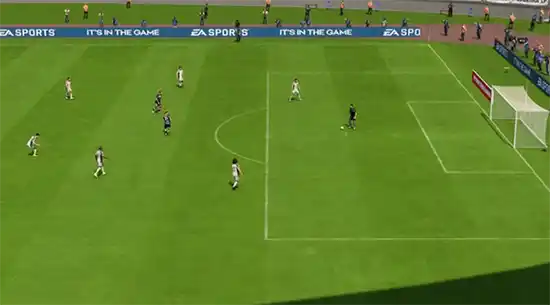
Tele Broadcast
A Tele based camera that shows the matches from the side with a mid-range perspective similar to a TV broadcast camera.
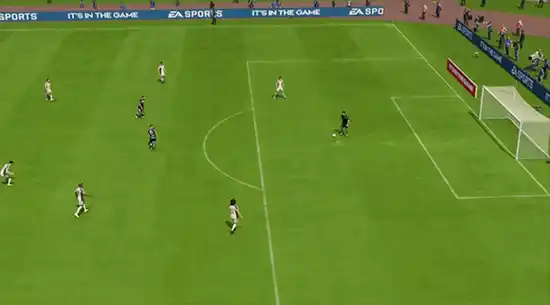
Tele
A camera which shows the matches from the side with a short-range perspective similar to TV camera.
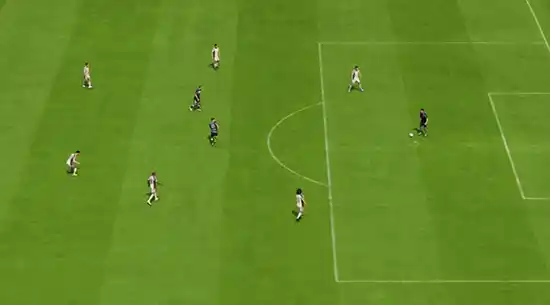
Co-Op
A side view camera with a long-range perspective but similar to isometric projection. This camera is used for Co-op mode, which gives you more perspective to see your other teammates in one frame. This camera is good for you if you’re into passing rather than dribbling.
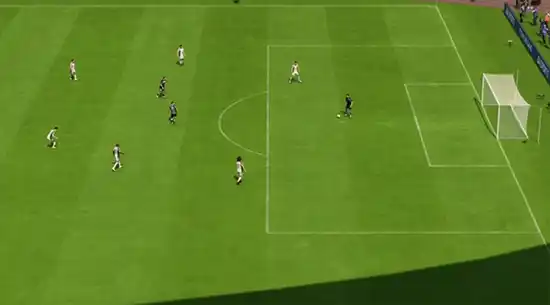
Classic
The classic camera in Football Club shows the matches from the side with a long-range perspective but with low height and close zoom.
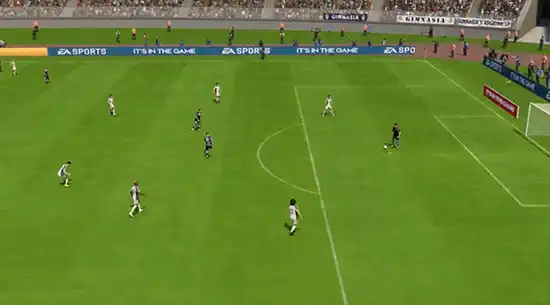
Dynamic
A dynamic camera with a short-range isometric perspective, low height, and close zoom. The focal point of this camera is strongly on the ball, and it works better for people who are into dribbling.
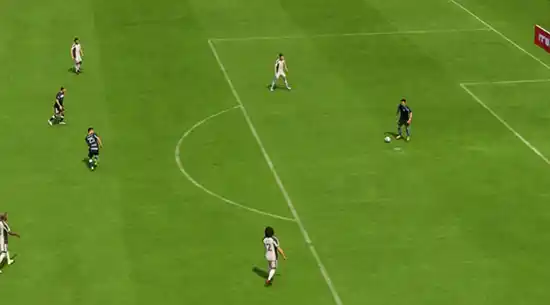
End to End
The end-to-end camera shows the match from the back of the field (from one end to another) instead of the side view. Similar to the bird’s eye view, this camera is projecting from the top and travels from one end to the other following the match ball.
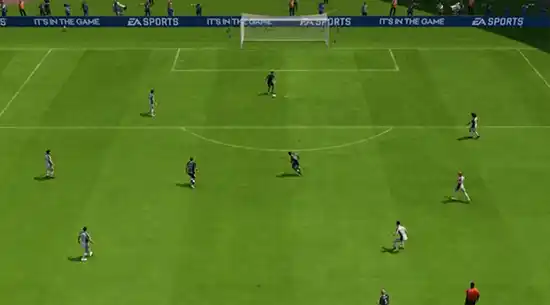
Pro
This camera type will follow your Virtual Pro (as player or goalkeeper) and is useful when playing Pro Clubs/Be a Keeper mode.
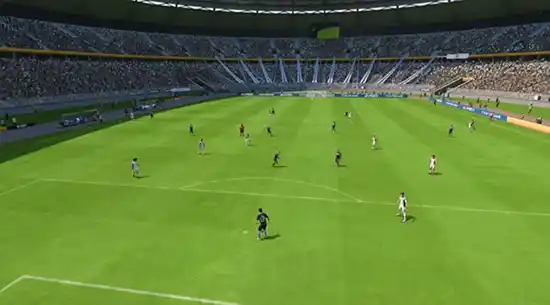
Broadcast
A side view camera is located in the center of the field and only changes its viewing direction to follow the ball rather than moving the camera. Playing using this camera will give you dimensional angles depending on the ball’s location.
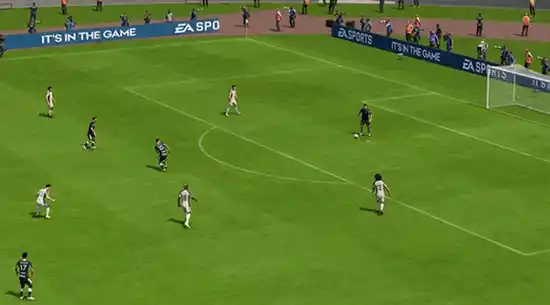
Competitive UT
A way to see more of the pitch, while still showing off the stadium and its atmosphere. This camera is on a rail, ensuring more predictable pad angle behavior to aid Competitive Gameplay.
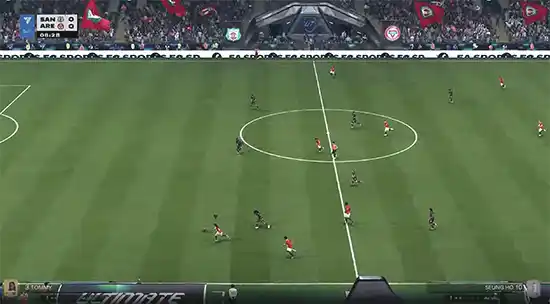
New in FC 26
When it comes to cameras, there is one significant addition compared to the previous title, tailored for the Ultimate Team mode:
Competitive UT
Broader tactical view while maintaining a stable angle for consistent competitive play and enhancing the visual stadium experience.

Rush Cameras
Due to the unique aspects of the game and field, Rush has its own cameras. You can choose from four options.
Rush Pro
mmersive close-up camera that replicates a player’s on-field perspective.
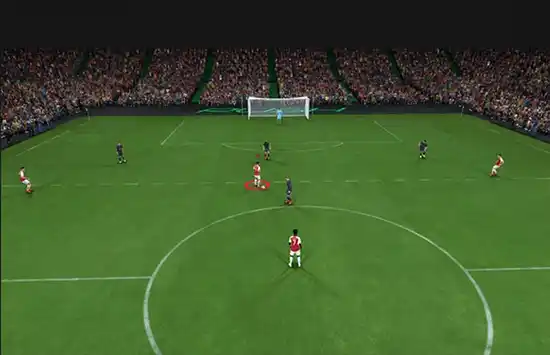
Rush End to End
Dynamic tracking from goal to goal that follows the flow of play.
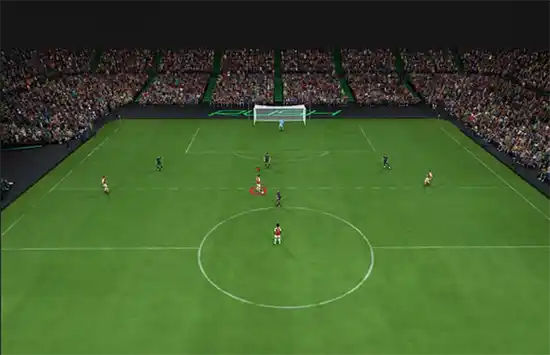
Rush Broadcast
TV-style camera offering a cinematic match presentation.

Rush Tactical
Wide strategic view designed to show full team positioning.

| New Cameras will be announced later |
How to Change the Camera Angle
You can adjust the active camera view before a match, during gameplay, or through the game settings menu.
How to Change Camera Globally
- From the main FC 27 screen, navigate to [Settings];
- Select [Game Settings];
- Press R1/RB once to go to the [Camera] menu and change the camera.
You can set a camera view to each match type from the Camera Settings screen.
- Single-Player Camera;
- Multiplayer Camera;
- Locked to Player Camera;
- Clubs Camera;
- Be a Keeper Camera.
Camera Settings
Choosing the camera is only one way to personalize your experience. In the game settings, you can also set Camera Settings to Custom, allowing you to adjust multiple elements if you want to modify the angle from the standard options:
- Camera Height (from 0 to 20);
- Camera Zoom (from 0 to 20);
- Pro Camera Zoom (from 0 to 20);
- Pro Camera Speed (from 0 to 20);
- Pro Camera Swing (from 0 to 20);
The Best Camera Settings
When you first launch FC 27, the default camera is set to Legacy. Many players in the community, however, believe there are better options, and you might feel the same.
Finding the ideal camera settings is easier than it seems. Whether you prefer a wide view of the pitch or a closer focus on the player with the ball, FC 27 offers several camera options. The key is to experiment with different settings to discover what works best for you.
If you’re unsure where to start, consider our camera recommendations for casual and competitive players.
- Casual Players
1 Co-Op | Height: 20 | Zoom: 0
2 Tele-broadcast | Height: 17 | Zoom: 0
Alternatively, the Tele-broadcast camera is a reliable choice. While height and zoom are subjective, it’s best to avoid excessive zoom to maintain a full view of the pitch and keep track of the action.
- Competitive Players
1 Tele-broadcast | Height: 10 | Zoom: 0
2 Co-Op | Height: 17 | Zoom: 3
The Tele-broadcast view provides a clear sight of players on the opposite side of the pitch while keeping focus on the ball carrier. Co-Op offers a broader field perspective, ideal for frequent passing or switching plays.
Both camera types can be customized further by adjusting height and zoom. For a balanced view, keep zoom below 5 and set height between 10 and 17 for an optimal field perspective.
Frequently Asked Questions
Tele Broadcast and Co-Op Camera are the most popular cameras in FC 27 for casual and competitive players.
It depends on the camera angle and your preferences, but we suggest setting the camera heigh between 10 and 20 and the camera zoom lower than 5.
Legacy is the active camera when you start playing Football Club 27.
There are several ways to change the active camera view in FC 27:
How to Change Camera Globally
- From the main FC 27 screen, navigate to [Customize];
- Select [Settings] and then [Game Settings];
- Press R1/RB once to go to the ‘Camera’ menu and change the camera.
- Navigate to [Game Settings];
- Press R1/RB once to go to the ‘Camera’ menu and change the camera.
- Pause the game and navigate to [Settings];
- Select [Game Settings];
- Press R1/RB once to go to the ‘Camera’menu and change the camera.
If you want to change camera height and zoom, follow these steps:
- From the main FC 27 screen, navigate to [Customize];
- Select [Settings] and then [Game Settings];
- Press R1/RB once to go to the [Camera] menu;
- Scroll down to [Camera Settings] and change it to ‘Default’;
- You can now change Camera Heigh and Camera Zoom as you wish.
You can set a camera view to the following match types:
- Single-Player Camera
The camera you use for all your offline and online single-player 11v11matches. - Multiplayer Camera
The camera you use for all your offline multiplayer 11v11 matches. - Locked to Player Camera
The camera you use when playing locked to a player 11v11 matches. - Clubs Camera
The camera you use for your online Clubs and Drop-In 11v11 matches. - Rush Camera
The camera you use for all your Rush matches. - Be a Keeper Camera
The camera you use when you’re a goalkeeper.
0
0
votes
Article Rating
Subscribe
Login
0 Comments
Newest
Oldest
Most Voted
Inline Feedbacks
View all comments