
Smart Tactics for Ultimate Team
Smart Tactics let you adjust your approach in key moments without having to pause the match.
They make in-game strategy changes easier and more intuitive, fully integrating tactical control into live gameplay. The system offers tactical suggestions based on match dynamics, enabling quick decisions that can shift momentum. With simple D-Pad inputs and clear on-screen visuals, it helps players adapt instantly to any situation.
How to activate a FC 27 Smart Tactic?
- While playing a match, move the D-Pad once to display the Tactics Group (arrows on PC)
- Move the D-Pad again to select the action you want to activate.
- My Tactics;
- Tactical Focus;
- Quick Tactics;
- Tactical Suggestions.
My Tactics
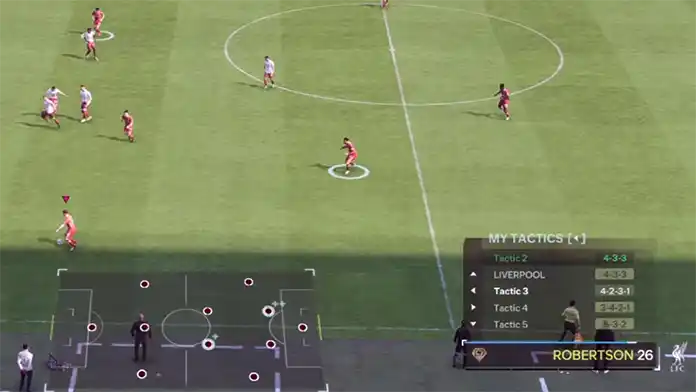
he first set of Smart Tactics allows you to switch your active formation to one of the four alternatives you’ve marked as preferred.
Pressing the D-Pad to the left displays your four additional formations, along with the one currently in use at the top. Another press confirms the change and instructs your team to adopt the new setup.
As in real football, the transition takes a bit of time to complete. While players reposition, the message “Tactical Change in Progress” will appear on screen. The adjustment happens faster when the ball is out of play or during a stoppage. To cancel the change, simply open the My Tactics menu again and reselect your previous setup.
| My Tactics |  |
| Custom Tactic 1 | /  |
| Custom Tactic 2 | / |
| Custom Tactic 3 | /  |
| Custom Tactic 4 | /  |
Tactical Focus
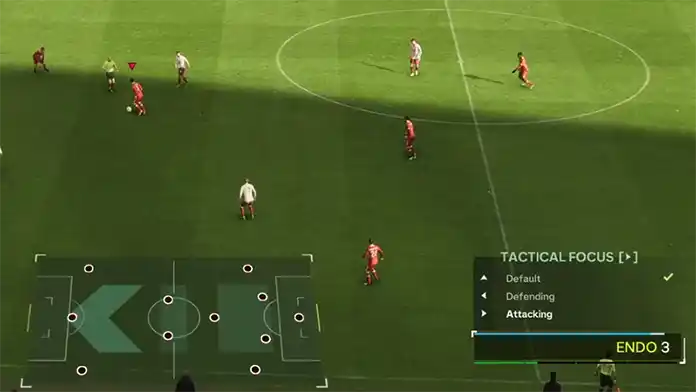
Rather than completely overhauling your tactic, Tactical Focus tweaks your existing setup while keeping your chosen Formation and Roles intact. It fine-tunes the Build-Up Style, Defensive Approach, and Role Focus.
Pressing the D-Pad to the right reveals three options you can switch between: Default, Attacking, or Defending.
Selecting “Attacking” raises both Build-Up and Defensive Approach by one level and shifts all Role Focuses toward a more offensive mindset. Choosing “Defending” does the opposite, lowering both settings by one level and moving Role Focuses to a defensive stance.
After selecting an option, the message “Focus Change in Progress” may appear until the adjustment is complete. If a player is already set to a defensive focus when the Defending option is applied, no further change will occur.
| Tactical Focus | |
| Default | , |
| Defending | , |
| Attacking | , |
Quick Tactics
Quick Tactics allow you to issue specific instructions to your team. If you’ve played previous editions of the game, you’re already familiar with how this feature works.
By pressing Up on the Directional Button, you’ll access the four available Quick Tactics:
Offside Trap
This tactic pushes your defenders forward to disrupt your opponent’s through-ball passes and catch attackers offside. It coordinates your defenders’ movement as a unit, minimizing potential offside threats.
Team Press
Activating this tactic instructs your team to apply relentless pressure on your opponent. Your players will push forward and press aggressively, making it hard for your opponent to find safe passing lanes.
Overload Set Pieces
This increases the number of players in the box during Free Kicks and Corner Kicks. Unlike other Quick Tactics, it can be activated at any time, except during a Set Piece itself.
Get in Box
This encourages more players to move into the penalty area to anticipate crosses. When activated, players on the edge of the box make runs toward the goal, while midfielders also push forward to support the attack and position themselves near the box’s edge.
| Quick Tactics | |
| Offside Trap | , |
| Team Press | , |
| Overload Set Pieces | , |
| Get In Box | , |
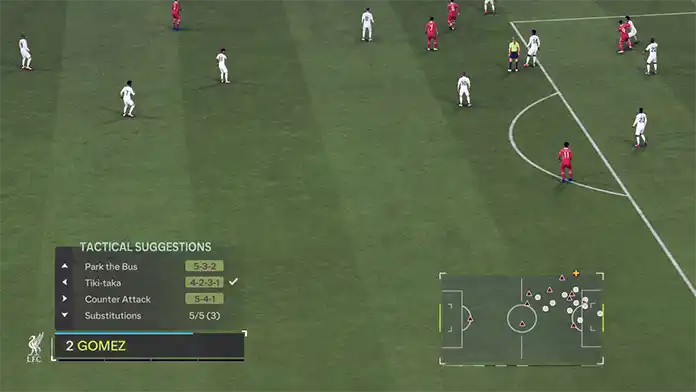
Tactical Suggestions
A real-time tactical suggestion system suggests tactical changes based on the match’s flow and you can implement them by pressing Down on the Directional Button.
The Substitution sub-menu will show your Suggested Subs, Custom Subs, or a mixture of both and can display up to four entries at a time.
Balanced
A structured approach that aims to maintain team shape to stay strong defensively while still being able to construct attacks.
Tiki Taka
This approach demands that the entire team be comfortable on the ball, as it uses short passing and constant rotations to create space for attacks.
Long Ball
A direct approach that gets the ball forward quickly, relying on the strength and athleticism of powerful forwards to exploit space behind defenders and battle for second balls and rebounds.
Counter Attack
This approach sees the team sit back and defend the area before rapidly breaking when possession is regained.
Wing Play
This approach uses the entire width of the pitch, switching play to wide positions and overloading the flanks to create crossing opportunities.
Park the Bus
Disciplined and well-organized defending, with a compact defensive line to prevent opposition attacks.
Pressing
our team will attempt to win back the ball quickly and high up the pitch, using fast turnovers to create goalscoring opportunities.
| Tactical Suggestions | |
| Tactic Suggestion 1 | , |
| Tactic Suggestion 2 | , |
| Tactic/Focus Suggestion | , |
| Substitution | , |