
FC 27 PREVIEW PACKS

FC 27 Preview Packs let you open them for free, see the contents, and choose whether to buy the packs.
FC 27 Packs

What are Preview Packs


Ultimate Team Packs are in-game virtual packs containing randomized items like players and club assets. Traditionally, their contents were unknown until opened, following the loot box model.

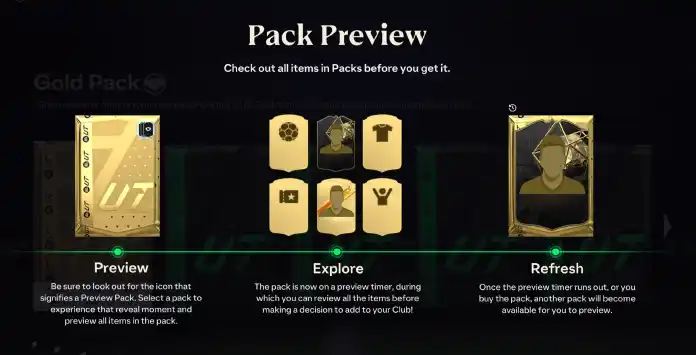
In June 2021, preview packs were introduced, letting you view the items before deciding whether to purchase the pack using FC Coins or FC Points.

After previewing, you can choose to buy the pack or skip it. Each pack is only available for a limited time, after which you can preview another of the same type or explore different pack options.
Where to Find Them


Preview Packs are available in the UT store as any other pack. You can distinguish them by the name (‘Preview Pack’ in the end) and by a small icon on the top right corner of the pack art.

Only the standard packs are available permanently in the store:
More preview packs are released throughout the year but they are only available in selected times during special UT events. In this category are included:
FC 27 Preview Packs

How to Preview Packs in FC 26


FC 27 Preview Packs let you check their contents before making a purchase. Select the ‘Preview Pack’ option in the store to see the items inside, then choose to either exit without buying or acquire the pack using your FC Coins or FC Points.

How To Open Preview Packs
  1. From the main Ultimate Team screen, navigate to [Store];
  2. Check if you are in the [Browse] tab and scroll down to [Gold Packs], [Classic Packs] or, in selected times, [Promo Packs];
  3. Search by packs with ‘preview’ in the name and select one of them;
  4. See the pack content;
  5. Press X/A to buy the pack or circle/B to leave without buying it.
If you purchase the pack, a new preview pack will be displayed. If you skip it, you must wait for the countdown to finish before previewing another pack.

Before the timer runs out, you can revert your decision by going to the Ultimate Team store, opening the ‘Previewed’ tab, and selecting the pack you previously dismissed.
Frequently Asked Questions
A FC 27 Preview Pack is a variant of existing Ultimate Team packs in which the player can see the content before deciding to buy it or not.
Premium Silver Preview Packs and Premium Gold Preview Packs are available in the UT store most of the time. In addition, more preview packs are released throughout the year but only at selected times.
You can preview packs only if they are labeled as previewable. Visit the FUT store and select a pack that includes ‘preview’ in its name. After viewing the contents, you can decide whether to purchase it.
FC 27 preview packs are refreshed every 24 hours unless you buy them. In that case, a new pack is immediately available to be previewed.
If the preview pack isn’t what you expected and you choose not to spend your coins or FC Points, it will stay in the store for a limited period. You must wait for the countdown to finish before previewing another pack.
As with all packs, previewed items may include duplicates. However, pressing Triangle/Y while previewing a pack will highlight any items you already own in your club.
FC 27 preview packs don’t cost more than the respective regular packs. Instead, they have the same price.
No. The content is immediately shown to you when you open a preview pack. Only then can you decide to buy it or not.
Packs acquired outside the FUT Store, such as rewards from Division Rivals, Objectives, or SBCs, cannot be Preview Packs. Preview Packs are available exclusively in the Ultimate Team store.
0 0 votes
Article Rating
Subscribe
Notify of
guest
0 Comments
Newest
Oldest Most Voted
Inline Feedbacks
View all comments