
FC 27 CARRYOVER
FC 27 won’t allow you to carryover and maintain most of your FC 26 progress.
FC 27 Carryover
If you achieved notable milestones in FC 26 Ultimate Team, you’re probably curious about the FC 27 transfer system and what progress can carry over. Unfortunately, only your FC Points, Rivals Division rank, and UT Club Profile will transfer. Other data will not.
Ultimate Team is the sole mode that supports some progression carryover. Progress in Player/Manager Career, Seasons, Online Friendlies, and Clubs will be lost when transitioning from FC 25.
How To Transfer FC 26 data and items to FC 27
- Open the new title in your console;
- Follow the on-screen instructions;
- When prompted, confirm if you want to carryover your data and items.
Transferable Items
When you move to a new title, you can maintain part of your progress from the previous game.
FC Points
It’s the virtual in-game currency of Football Club that you could only purchase using real-life money. It’s used to buy UT packs, pay Evolutions, and enter Drafts. You have the option to keep your FC Points balance on FC 26 or transfer them to FC 27 before January 01, 2027. Keep in mind that this is a one-time transfer, so you need to be careful when you start the game for the first time.
Rivals Division
In FC 27, your starting Division in Rivals will be based on your highest Division from FC 26. This helps you find a suitable Division faster, earn better rewards quicker, and prevents new players from facing veterans immediately. Ensure you’re on the same EA Account for your Division Rank to carry over. If you have progress on multiple platforms, your highest Division Rank will transfer.
UT Club Profile
Whether you are a UT Founder or not, your established date will remain the same.
Non-Transferable Items
When you move to a new title, you cannot maintain most of your progress from the previous game.
UT Coins
Coins are gained by playing UT game modes and as in-game rewards. Since FC 26 and FC 27 are two distinct games, each has its own coin balance, which cannot be shared between them. In other words, the coins you had in FC 26 will remain there, and in FC 27, you’ll start from scratch.
UT Items
They are used to build your squad and provide support for it. Unfortunately, none of your cards in FC 26 will be carried over to FC 27. This applies to all item types: players, staff, consumables, vanity items, and stadiums.
Unopened Packs and Unassigned Items
They are not transferred to FC 27, so don’t save them from being opened later if your season ends. At least try to find out which cards you would pack.
UT SP
By completing Objectives, you earn UT SP. As you probably know, UT SP resets at the end of every season, so naturally, it isn’t transferred to new titles.
Match Records & History
Your Wins/Draws/Losses history will be lost when you stop playing FC 26. It won’t count towards FC 27.
Club Data
You won’t be able to carry over data such as your club statistics, leaderboard information, UT Champions Points, Draft, objectives, and SBC progress.
Achievements and Trophies
FC 26 and FC 27 are two different games, so you won’t be able to carry over your consoles trophies and achievements for the new title.
Transfer your Progress
Cross-Play is supported in Football Club 27, letting you compete with players across different platforms. There is a shared UT Transfer Market for PlayStation and Xbox Series consoles, while PC and Switch continue to operate separate markets.
However, cross-platform carryover is not yet available in FC 27. Your in-game items and progress can only transfer to the new FC title if you play on the same platform as your previous EA game.
This also applies if you play a FC game on multiple platforms simultaneously. Even using the same email to register accounts, each platform retains its own separate in-game data and items.
Carryover Scenarios
Depending on your old and new platforms, as well as whether you are moving from FC 26 or not, there are four different carryover scenarios. To clear up any questions you may have, we have listed how carryover works for each one.
Keep Everything
If you stay on the same platform with the same account in FC 27, you retain all progress.
- From PlayStation 5 to PlayStation 5 (FC 27 > FC 27)
- From PlayStation 4 to PlayStation 4 (FC 27 > FC 27)
- From Xbox Series X|S to Xbox Series X|S (FC 27 > FC 27)
- Xbox One to Xbox Series X|S (FC 27 > FC 27)
- From PC to PC (FC 27 > FC 27)
If moving from FC 26 to FC 27 on the same platform with the same account, only transferable items carry over.
- From PlayStation 5 to PlayStation 5 (FC 26 > FC 27)
- From PlayStation 4 to PlayStation 4 (FC 26 > FC 27)
- From Xbox Series X|S to Xbox Series X|S (FC 26 > FC 27)
- From Xbox One to Xbox Series X|S (FC 26 > FC 27)
- From PC to PC (FC 26 > FC 27)
When switching between different console generations, you keep only Ultimate Team data.
- From PlayStation 5 to PlayStation 4 (FC 27 > FC 27)
- From PlayStation 4 to PlayStation 5 (FC 27 > FC 27)
- From Xbox Series X|S to Xbox One (FC 27 > FC 27)
- From Xbox One to Xbox Series X|S (FC 27 > FC 27)
All other platform scenarios do not allow carryover.
- All other scenarios
Frequently Asked Questions
It will start once FC 27 becomes available for EA Play subscribers or Ultimate Edition players.
Once you get into the new game, using the same account, you will be notified about the transferable items.
You can’t. If you haven’t played FC 26, you won’t be able to transfer your UT club profile or FC Points.
It was reset. It usually happens when you skip a title or your profile is corrupted. This is particularly frustrating for Founders, players who are playing since the first FC edition.
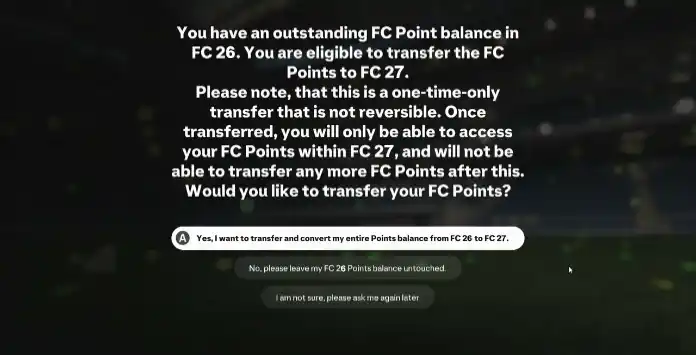
The first time you log in with the same account, the system recognizes you and you’ll see a pop-up that gives you the option to transfer your FC Points:
‘We’ve noticed you have an outstanding FC Points balance in FC 26. Would you like to transfer and convert it to FC Points in FC 27? Please note, this transfer is not reversible. Once you have transferred your Points balance you will only be able to access it within EAS FC 27. This is a one-time only transfer, you will not be able to transfer any more Points after this.’
You can accept it or delay that operation. This pop-up will give you the following options:
‘We’ve noticed you have an outstanding FC Points balance in FC 26. Would you like to transfer and convert it to FC Points in FC 27? Please note, this transfer is not reversible. Once you have transferred your Points balance you will only be able to access it within EAS FC 27. This is a one-time only transfer, you will not be able to transfer any more Points after this.’
You can accept it or delay that operation. This pop-up will give you the following options:
- Yes, I want to transfer and convert my entire Points balance from FC 26 to FC 27.
- No, please leave my FC 26 Points balance untouched.
- I am not sure at this point, please prompt me again later.
You can transfer your FC Points from FC 26 to FC 27 using a one-time transfer option available until December 31, 2026. The earliest opportunity to transfer your FC Points is during the EA Play trial or when you first log in to FC 27 after acquiring the full game. Please note that it is not possible to transfer FC Points via the Web and Companion Apps
No. You can only transfer FC Points from FC 27 to FC 27 on the same console. You need to buy FC Points for the console you will use.
In FC 27, your starting Division in Rivals will consider the highest Division you reached in FC 26. This helps you reach an appropriate Division faster, earn better rewards sooner, and prevents new players from facing highly skilled veterans at the beginning of the season.
The exact Division you start in for a new season depends on your placement in the previous season, as illustrated in the table below.
The exact Division you start in for a new season depends on your placement in the previous season, as illustrated in the table below.
FC 26 Division | FC 27 Division |
|---|---|
No, Ultimate Team Coins cannot be transferred between FC 26 and FC 27. Using them to purchase items in FC 26 won’t facilitate their transfer, as they cannot be moved between the two versions.
Yes, it is.
To be able to maintain the transferable items in the new title, you need to use the same account. In other words, you need log in with the same console ID.
Yes. With the addition of UT cross-play, the UT Transfer Market was expanded to include cross-platform functionality. The UT Transfer Market will now be combined within pools of platforms with the exception of PC and Switch, which will continue to have their own separate Transfer Markets.
Yes, but it is like you are playing different games. Your current data won’t be shared between different platforms.
No. Everything will start again once you play the final game for the first time.
Yes. When you are playing the EA Play trial, you are already playing the final version of FC 27. The only difference is the 10-hour limit.
A: There are essentially three main reasons for this:
- Playing the same game repeatedly may become unchallenging for many players.
- Electronic Arts resets the game to encourage players to invest in it once more.
- This approach helps maintain a fair, competitive, and sustainable gaming environment.
Double-check if you were not banned and contact the EA Support.
0
0
votes
Article Rating
Subscribe
Login
0 Comments
Newest
Oldest
Most Voted
Inline Feedbacks
View all comments