
If EA Sports FC means as much to you as it does to us, taking the time to protect your FC 27 account is essential. This guide explains how to safeguard your progress and recognize the scams and deceptive tactics used to steal sensitive account information.
How to Keep Your FC 27 Account Safe
To reduce the risk of falling victim to phishing attempts and other scams, follow these key guidelines:
- Access your EA Account by typing https://www.ea.com/ directly into your browser or by using a trusted bookmark;
- Before entering any information, verify that the final website address belongs to ea.com or to a legitimate subdomain ending in .ea.com;
- Do not share your password, verification codes, passkeys, backup codes, or other sensitive account information;
- Do not share personal information on forums, social media, or through your console’s messaging system;
- Avoid clicking links in unsolicited emails or messages that request account details, offer free content, or claim that immediate action is required.
EA representatives will never ask for your password, verification codes, or passkeys. Any message requesting this information should be treated as a potential phishing attempt.
How to Avoid Scammers
Scammers often target EA Sports FC players to gain access to their accounts, Ultimate Team items, or Coins. Understanding the most common tactics can help prevent you from becoming a victim.
Fake Emails and Copycat Websites
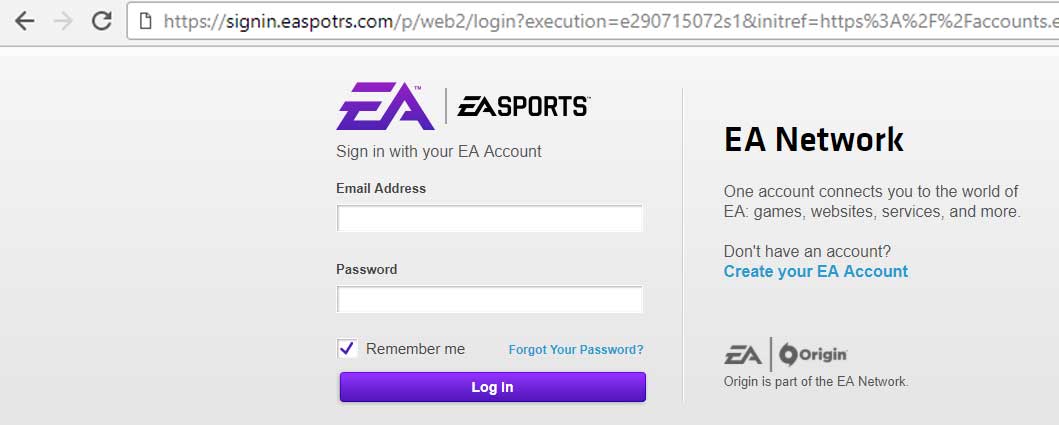
You might receive an email or message that appears to be from EA and promotes a special Ultimate Team offer. Clicking its link may take you to a page that closely resembles an official EA sign in screen. If you enter your account information, the scammers may use it to access your account and remove players, Coins, or other content.
Phishing works by directing users to fake websites designed to collect passwords, verification codes, and other sensitive information. These pages can closely imitate legitimate EA websites, so their appearance alone cannot confirm that they are genuine.
Always inspect the complete website address before entering any information. A legitimate EA address uses ea.com or a valid subdomain ending in .ea.com. An address such as ea.com.fakesite.com does not belong to EA. When in doubt, close the page and access your account directly through https://www.ea.com/.
Redirecting
Some scams use links that initially appear to point to a legitimate website but then redirect you to a fraudulent page. One example is:
https://www.ea.com/redirect?url=https://fakesite.com
The presence of redirect in a link should be treated with caution, particularly when the destination is an external website. Always inspect the final address displayed by your browser. If the destination does not belong to ea.com, do not enter any account information.
Scare Tactics
Some scammers try to frighten you into acting quickly. A typical message might claim that your account has been suspended, compromised, or selected for an urgent security review. The message then directs you to a fake website designed to steal your login information.
EA may send legitimate security, suspension, or account lock notifications. However, these messages will not ask you to reveal your password, verification codes, or passkeys. Instead of using a link in a suspicious message, open EA Help or the EA website directly and check your account from there.
Direct Contacts
If you receive a private message on a forum, social network, or console claiming to be from EA staff, exercise caution. Scammers often use convincing names such as “EA Admin” or “EA Developer” to appear legitimate.
Do not provide account information or follow instructions received through unsolicited private messages. Official support should be accessed through EA Help. Report suspicious messages using the forum, social network, or platform reporting tools.
Fake Web App and Reward Links
Scammers may distribute links that claim to show a shared squad, provide free packs, grant Coins, or unlock special rewards. These links can lead to fake versions of the Ultimate Team Web App or other fraudulent sign in pages.
EA will not require your password or verification code to grant packs, players, Coins, or other rewards. Access the Ultimate Team Web App and Companion App only through official EA channels. If a squad, reward, or promotional link unexpectedly asks you to sign in, close it and navigate to the official website yourself.
Additional Security Steps
Beyond the guidelines above, the following measures can add extra layers of protection to your FC 27 account.
Preview Links
Hover over a link before clicking it to preview its destination. On mobile devices, pressing and holding a link will usually display its address. Remember that shortened links and redirects can hide the final destination, so previewing a link should not be your only security check.
Use a Password Manager
A reputable password manager can generate and store strong, unique passwords for your EA Account, console account, and email. Password managers generally fill credentials only on recognized websites, which may help identify a fake page. However, automatic filling should not be treated as definitive proof that a website is legitimate, so always check the address as well.
Create Strong and Unique Passwords
Use a long, unique password for your EA Account and never reuse it for your email, console account, or other services. If one account is compromised, password reuse can allow attackers to access several services. Change your password immediately if you suspect that it has been exposed.
Protect Your Email Account
Your email account can be used to reset your EA password, making it an important part of your security. Protect it with a unique password and two factor authentication. You should also add a secondary email address to your EA Account so that EA can contact you if you lose access to your primary address.
Avoid Shared and Public Computers
Avoid signing in to your EA Account on shared or public computers. These devices may contain malicious software or keyloggers capable of recording your password. If you must use one, do not mark it as trusted, sign out when finished, and review your trusted devices afterward. If you suspect that your information was captured, change your password from a secure device.
Use Browser Security Tools
Keep your browser and operating system updated and enable their built in protection against phishing and malicious websites. These tools can provide useful warnings, but they do not replace checking the complete website address before entering sensitive information.
Turn On Two Factor Authentication
EA two factor authentication adds another layer of protection to your account. When it is enabled, EA may request a security code when a new device attempts to sign in. Depending on the options available for your account, codes can be delivered by email, text message, or an authenticator app.
An authenticator app is generally the most secure code based option. Store your backup codes in a safe place and never share verification codes with anyone, including someone claiming to work for EA.
Use a Passkey
If the option is available for your EA Account, consider setting up a passkey. Passkeys allow you to sign in using your device’s security method and provide stronger protection against phishing than a traditional password. Never approve an unexpected passkey request or share access to your device.
Review Trusted Devices
Regularly review the trusted devices associated with your EA Account and remove any device you do not recognize or no longer use. If you notice suspicious activity, reset your EA password, secure your email and connected platform accounts, and enable two factor authentication.
Double Check Emails
If you receive a suspicious email, do not panic or act immediately. Scammers can copy the images and wording used in legitimate EA communications, and the displayed sender name can be misleading. Inspect the sender’s complete address and preview every link, but remember that these checks alone cannot guarantee authenticity.
EA may legitimately send password reset messages, verification codes, security notifications, service information, and account sanction notices. However, EA will not ask you to reply with your password, verification code, passkey, or backup codes. If you are uncertain, avoid the links in the message and access your EA Account or EA Help directly.