FC 27 WEB APP
FC 27 Web App lets you manage your UT for consoles directly from a web browser.
FC 27 Web App
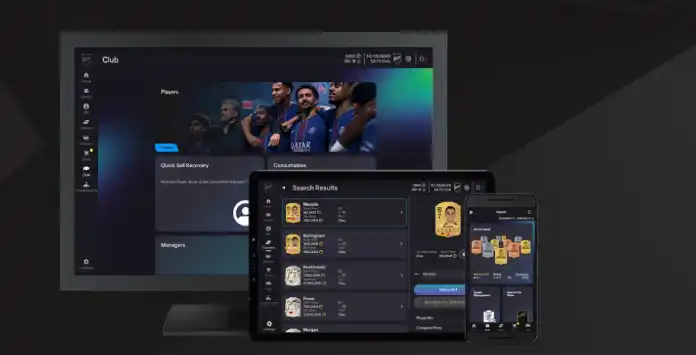
The FC 27 Web App is an online tool that lets you manage your FC 27 club on PlayStation, Xbox, or PC directly from a web browser. While you can’t play matches, nearly everything else is at your fingertips:
- Manage and share UT squads (including concept squads);
- Search, sell, and trade items on the transfer market;
- Purchase packs and FC Points from the store;
- Complete squad building challenges;
- Fulfill squad management objectives;
- Redeem Squad Battles, Rivals, and Champions rewards;
- Check leaderboards;
- Customize your active stadium.
Keep in mind that the FC 27 Web App won’t function if you’re logged into Ultimate Team 27 on your console or PC. To access it, exit UT and return to the main FC 27 menu before signing in.
FC 27 Web App Access
The FC 27 Web App is available for everyone who has a UT account and a device with internet connection.
How to access the FC 27 Web App
- Open a web browser and type the following URL in the address bar: https://www.ea.com/ea-sports-fc/ultimate-team/web-app/
- Double-check if login verification is turned on;
- Log in with your Origin credentials;
- Accept the user agreement.
FC 26 players have the chance to start their new season early in the FC 27 Web App. However, early access is not available to everyone. To be eligible, players need to fulfill specific conditions:
- They must have created a Ultimate Team Club in FC26 and logged in to UT on their platform before August 1, 2026;
- The UT 26 account must still exist – players who have deleted it won’t have access to the early start;
- Their accounts need to be in good standing – weren’t banned or had other actions taken on their account in UT 26.
Transfer Market Access
Access to the Transfer Market is a privilege granted to returning players. If you’re new to Ultimate Team or your account isn’t in good standing, you’ll need to earn access before you can start using it.
How to Unlock the FC 27 Transfer Market
- Complete the Foundations Objective Group.
- Play 30 matches in any game mode.
- Play 5 Rivals Matches.
- Play 8 Rush Matches.
- Play 8 Squad Battles Matches.
- Play the Squad Battles Featured Squad.
- Complete 5 Rush bonuses.
- Finish the first onboarding Moment
- Complete the Foundations EVO
- Score 15 goals in any game mode.
- Assist 25 times in any game mode.
- Complete the Football 101 Moments group.
- Complete any 2 SBC groups.
- Once the objectives are completed, you will receive a message confirming that the market has been unlocked.
- Wait 24 hours to gain unlimited access (48 hours for PC). Until then, you can list as many items as you want, but you won’t have access to search the Transfer Market and Bid/Buy Now actions until the time period has elapsed.
Web Release Date
As in recent years, early access to the FC 27 Web App begins on September 16, 2026.
The FC 26 Web App will go offline for maintenance five days earlier, on Friday night. From the launch date onward, the Web App will only support UT 27 squad management. Anyone wishing to manage their UT 26 squad must do so on their console.
| Videogame | Announcement Release Date |
| FC 27 | 11/09/26 17:00 Mon 16/09/26 18:00 Wed |
| FC 26 | 12/09/25 17:00 Mon 17/09/25 18:00 Wed |
| FC 25 | 16/09/24 17:00 Mon 18/09/24 17:50 Wed |
| FC 24 | 15/09/23 17:00 Fri 20/09/23 18:00 Wed |
| FIFA 23 | 15/09/22 18:00 Thu 21/09/22 18:45 Wed |
| FIFA 22 | 16/09/21 17:30 Thu 22/09/21 19:00 Wed |
| FIFA 21 | 01/10/20 18:00 Thu 30/09/20 17:45 Wed |
| FIFA 20 | 18/09/19 18:00 Wed 18/09/19 18:00 Wed |
| FIFA 19 | 14/09/18 18:00 Fri 19/09/18 21:30 Wed |
| FIFA 18 | 09/09/17 18:00 Sat 20/09/17 18:00 Wed |
| FIFA 17 | 20/09/16 18:45 Tue |
| FIFA 16 | 17/09/15 18:00 Thu 15/09/15 18:00 Tue |
| FIFA 15 | 17/09/14 22:00 Wed 18/09/14 20:00 Thu |
| FIFA 14 | 15/09/13 18:00 Sun 13/09/13 18:00 Fri |
| FIFA 13 | 18/09/12 18:00 Tue 20/09/12 18:00 Thu |
| FIFA 12 | 20/09/11 17:00 Thu |
| FIFA 11 | 13/09/10 17:00 Sun |
| FIFA 10 | Unknown Date |
Frequently Asked Questions
The FC 27 Web App release date is September 16, 2026 (around 6 pm UK time).
In order to access the FC 27 Web App, you need to:
- Open a web browser and type the following URL in the address bar: https://www.ea.com/ea-sports-fc/ultimate-team/web-app/
- Double-check if login verification is turned on;
- Log in with your Origin credentials;
- Accept the user agreement.
It happens automatically. The FC 26 app will be temporarily taken down for maintenance a few days before the release date of the FC 27 Web App.
You can manage your club from PlayStation 5, PlayStation 4, XBox Series X|S, XBox One, PC Origin, PC Steam, and PC Epic Games. The Web App is not compatible with Nintendo Switch.
Yes. All you need is a PC with an internet connection. Keep in mind that opening packs through the app requires FC Points or coins.
That’s not possible. Once the UT Web App for FC 26 is released, access to the FC 26 Web App is no longer available. Even so, you can still manage your squad directly on the console.
Your EA account is tied to an e-mail address that is used to login into the UT Web App. An EA account can have multiple Personas tied to it, depending on how many platforms you play.
By default, the Web app uses your last used FC Persona and unfortunately it doesn’t offer a way to change it.
The UT Web App offers speed and convenience for managing your UT club. Many traders rely on it to search, buy, and sell cards, as these actions require frequent and quick access to the market throughout the day.
The FC Web App is available on web browsers while companion app is available on iOS and Android devices. You should take your decision based on your devices and where you are. If possible, use both.
No, the Web App cannot be accessed while logged into FC 27 on a console or PC. To use it, sign out of your UT account on the console or PC by returning to the main FC menu, then log in to the Web App. Simply turning off the console or PC while in UT does not properly log you out, and you may need to wait a few minutes before accessing the Web App.
The UT Web App is translated in 21 languages:
- Arabic
- Brazilian Portuguese
- Chinese (Traditional)
- Chinese (Simplified)
- Czech
- Danish
- Dutch
- English
- French
- German
- Italian
- Japanese
- Korean
- Norwegian
- Polish
- Portuguese
- Russian
- Spanish
- Spanish (Latin America)
- Swedish
- Turkish
To change the app language, you just need to:
- Click on the [Settings] icon;
- Click [Select Language]
FC Points can be purchased on the FC 27 Web App following these steps:
- Go to the Web App and use your account details to login;
- Click on the green highlighted ‘+’ symbol next to your number of currently available points;
- If asked, introduce your console’s credentials associated to your UT club;
- You will be redirected to the FC Points section of your console’s store;
- Choose how many FC Points do you want to buy;
- Add to the cart and pay.
There isn’t a specific feature that lets you change the name of your UT club in the web app. However, you can do it on your console by going to [Club] > [Setting] > [Rename].
There are many reasons why the app may not be working, including the servers being down, maintenance or something wrong with your browser/account. If you don’t know how to fix it, we strongly recommend you follow our troubleshooting guide.
UT Web App maintenances are very rare.
This security feature, which replaced the security question from FIFA 19, prevents unauthorized logins to your EA Account from unrecognized devices without your password and verification method. The login verification process generates temporary numeric passcodes unique to you.
You will need your EA account email and password, and you may also be asked to enter a verification code.
It is strongly recommended to set up multiple methods for receiving your verification code, ensuring a backup if one fails. One of the most secure options is the authenticator app, which generates a 6-digit code in the Google Authenticator app that you can enter whenever required. Simply open the app and use the code displayed.
How to Enable the App Authenticator
It is strongly recommended to set up multiple methods for receiving your verification code, ensuring a backup if one fails. One of the most secure options is the authenticator app, which generates a 6-digit code in the Google Authenticator app that you can enter whenever required. Simply open the app and use the code displayed.
How to Enable the App Authenticator
- Go to your EA Account security settings page;
- Scroll down to [Two-Factor Authentication];
- Select [Turn On];
- Choose [Authenticator App];
- Install the Google Authenticator app for Google Play or iPhone;
- Open the Authenticator App and click [Begin Setup];
- Choose how you want to set up the authenticator:
– Choose Scan barcode to scan the QR code from your Settings
– Choose Manual entry to type in your EA Account’s email address and the Secret Key from your Settings; - Enter the code that the authenticator gives you and click [Save].
If you switch plateforms, no. Returning user rewards are tied to your specific console account. So if you switch platforms or create a new account on the same platform, your access and rewards won’t carry over.
FC 27 Web App early access is only available for FC 26 players who fulfil specific conditions:
- They must have created a UT club in FC 26 and logged in to UT 26 on their platform before August 1, 2026;
- The FC 26 account must still exist;
- Their accounts needs to be in good standing.
Yes. You can get early access to the web App without pre-ordering the game. However, if you don’t buy the game, the access to the app will expire on November 13, 2026.
Access to the Transfer Market is reserved for returning players. If you have used the Transfer Market in previous FC games and your UT account is in good standing, you may gain immediate access. New Ultimate Team players or accounts with restrictions must earn access by completing the ‘On Your Way’ Foundation Objectives. Full market access is granted after 24 hours on consoles or 48 hours on PC.
Your Transfer Market ban won’t roll over to FC 27, but you’ll need to earn access again.
0
0
votes
Article Rating
Subscribe
Login
0 Comments
Newest
Oldest
Most Voted
Inline Feedbacks
View all comments