
FC 27 COMPANION APP
The FC 27 Companion App lets you manage your FUT club on consoles and PC directly from an iOS or Android device.
FC 27 Companion App
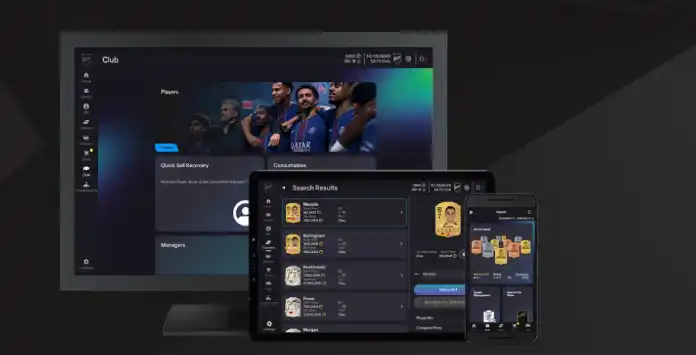
The Companion App lets you manage your FC 27 club on the go, directly from your iOS or Android device. With seamless integration between the Companion App, Web App, and your console, your Club stays up to date wherever you play. Although you cannot play matches, the app provides access to most Ultimate Team club management features:
- Manage and share UT squads, including concept squads;
- Search, sell, and trade items in the transfer market;
- Purchase packs from the UT store;
- Complete squad building challenges;
- Complete squad management objectives;
- Enhance and customise players with Evolutions;
- Redeem Squad Battles, Rivals, and Champions rewards;
- Customize the active stadium;
- Recover eligible Player Items using Quick Sell Recovery;
- Track your progress in each UT game mode.
Note that the app cannot be used while logged into the console or PC version of UT 27. In such cases, return to the main Football Club menu and try logging into the app again.
FC 27 Companion App Access
The Companion App is free to download on compatible iOS and Android devices. However, access to an FC 27 Ultimate Team club before the game launches is limited to eligible returning players whose accounts meet EA’s early access requirements.
How to access the FC 27 Companion App
- If you are installing for the first time, check if your device meets the system requirements (iOS 15.0+; Android 10.0+);
- Open the Google Play Store or the App Store in your phone or tablet;
- Search by ‘Companion’ and select ‘EA Sports FC 27 Companion’;
- Download the app (72.7Mb for iOS; 132Mb for Android).
Direct links: iOS | Android; - Install and run the app;
- Log in to your EA account.
- Create a UT Club in FC 26 and log in on their platform before August 1, 2026;
- Maintain an active FC 26 account – deleted accounts are not eligible;
- Keep their account in good standing, with no bans or other restrictions in FC 26.
Transfer Market Access
Downloading the Companion App does not automatically grant access to the Transfer Market. Eligible returning players using the same platform may receive immediate access if their account is in good standing, while new or ineligible accounts must earn access by playing Ultimate Team.
FC uses two related access systems:
- In-game Graduated Access
New players may need to complete a series of Foundations Objective Groups before receiving full access to the Transfer Market inside Ultimate Team; - Web and Companion App access
Access through the Web and Companion Apps is assessed separately and depends on account history, account status, the number of Ultimate Team accounts used on the device and the number of active days played.
An active day normally requires you to play three full Ultimate Team matches and log in to the Web App or Companion App during the same UTC calendar day. Playing additional matches on that day does not necessarily accelerate the process.
For an account in good standing that is the only Ultimate Team account used on the device, access may normally be granted after two active days. If several Ultimate Team accounts are used on the same device, it may take at least four active days or longer.
EA does not guarantee when access will be granted, and its advisors cannot manually unlock the Transfer Market. You will receive an in-game message when access becomes available.
Companion Release Date
In line with recent years, the FC 27 Companion App will launch one day after the Web App, on September 17, 2026.
For users with the FC 26 Companion App installed, the FC 27 version will be available as an update. Once updated, usually automatically, the app will no longer support managing your UT 26 club. To continue managing your UT 26 squad, you must use the console.
Throughout the FC year, regular updates will introduce new content and fix bugs to improve the Companion App experience.
| Videogame | Release Date |
| FC 27 | 17/09/2026 18:30 Thu |
| FC 26 | 18/09/2025 18:30 Thu |
| FC 25 | 19/09/2024 18:30 Thu |
| FC 24 | 21/09/2023 18:30 Thu |
| FIFA 23 | 22/09/2022 18:30 Thu |
| FIFA 22 | 23/09/2021 18:45 Thu |
| FIFA 21 | 01/10/2020 19:00 Thu |
| FIFA 20 | 19/09/2019 18:00 Thu |
| FIFA 19 | 20/09/2018 19:30 Thu |
| FIFA 18 | 21/09/2017 18:00 Thu |
| FIFA 17 | 21/09/2016 18:00 Wed |
| FIFA 16 | 15/09/2015 18:00 Tue |
| FIFA 15 | 18/09/2014 20:00 Thu |
| FIFA 14 | 15/09/2013 18:00 Sun |
| FIFA 13 | 04/10/2012 18:00 Thu |
Frequently Asked Questions
The FC 27 Companion App release date is September 17, 2026 (around 7 pm UK time).
In order to access the FC 27 Companion App, you need to:
- Go to your Google or Apple store and search by ‘EA Sports FC 27 Companion’;
- Download, install and run the app;
- Log in with your EA credentials.
If the FC 26 Companion App is already installed, it should receive the FC 27 update through the App Store or Google Play. If automatic updates are disabled, you may need to update it manually.
FC 27 Companion App requires iOS 15.0 or later and Android 10.0 or later.
You can manage your club from PlayStation 5, PlayStation 4, Xbox Series X, Xbox One, PC EA App, PC Steam and PC Epic Games. The Companion App is not compatible with Nintendo Switch.
Yes. The app is free to download and use. Packs purchased from the Store may require Coins or FC Points, while earned reward packs can be opened without an additional payment.
You cannot. After the FC 27 Companion App forced update, it is no longer possible to access the FUT Companion App for FC 26. However, you can still manage your squad on the console.
Your EA account is connected to an email address used to log into the UT Companion App. Depending on the platforms you play on, a single EA account can have multiple Personas linked to it.
By default, the Companion App uses your most recently active FC Persona. To switch to a different Persona, tap the [Settings] icon on the Home screen and select the [Persona] option (‘change’). To log in with a different EA account, you must sign out completely.
By default, the Companion App uses your most recently active FC Persona. To switch to a different Persona, tap the [Settings] icon on the Home screen and select the [Persona] option (‘change’). To log in with a different EA account, you must sign out completely.
The advantage of using the Companion App is that it provides a faster and more convenient way to manage your UT club. Many traders rely on it for searching, buying, and selling cards, as these actions often require frequent, quick visits to the market throughout the day. Unlike the Web App, these tasks can be done on the go.
The FC Web App is available on web browsers while the companion app is available on iOS and Android devices. You should take your decision based on your devices and where you are. If possible, use both.
No. If you are logged into the console or PC version of FC 27, you cannot access the Companion App. In this case, sign out of your UT account on the console or PC by returning to the main FC Menu, then try logging into the app again. Simply turning off your console or PC while logged into UT does not log you out properly, and you may need to wait a few minutes before accessing the Companion App.
You can access the same Ultimate Team club through either app, but using both simultaneously may cause a session to expire or require you to log in again.
The Companion App is translated in 21 languages:
- Arabic
- Brazilian Portuguese
- Chinese (Traditional)
- Chinese (Simplified)
- Czech
- Danish
- Dutch
- English
- French
- German
- Italian
- Japanese
- Korean
- Norwegian
- Polish
- Portuguese
- Russian
- Spanish
- Spanish (Latin America)
- Swedish
- Turkish
To change the app language, you just need to:
- Click on the [Settings] icon;
- Click [Select Language]
Currently, FC Point purchases using the Companion App on Android are only available if you play the game on a PC. Because of some platform pricing limitations across mobile, console, and PC, this feature is not available on iOS.
Currently there isn’t currently a feature that lets you change the name of your club on the Companion App.
There are several reasons the app might not be working, such as server outages, ongoing maintenance, or issues with your device or account.
Companion App maintenances are very rare.
This security feature, which replaced the security question in FIFA 19, prevents unauthorized access to your EA Account from unrecognized devices without your password and verification method. The login verification process generates temporary numeric passcodes specifically for your account.
You will need your EA account email address and password. You may also be required to input a verification code.
We highly recommend setting up multiple ways to receive your verification code, so you always have a backup if something goes wrong. One of the best options is the authenticator app, which offers the highest level of security. It generates a 6-digit code in the Google Authenticator app that you can enter whenever needed. Just open the app and use the code shown.
How to Enable the App Authenticator
We highly recommend setting up multiple ways to receive your verification code, so you always have a backup if something goes wrong. One of the best options is the authenticator app, which offers the highest level of security. It generates a 6-digit code in the Google Authenticator app that you can enter whenever needed. Just open the app and use the code shown.
How to Enable the App Authenticator
- Go to your EA Account security settings page;
- Scroll down to [Two-Factor Authentication];
- Select [Turn On];
- Choose [Authenticator App];
- Install the Google Authenticator app for Google Play or iPhone;
- Open the Authenticator App and click [Begin Setup];
- Choose how you want to set up the authenticator:
– Choose Scan barcode to scan the QR code from your Settings
– Choose Manual entry to type in your EA Account’s email address and the Secret Key from your Settings; - Enter the code that the authenticator gives you and click [Save].
If you switch platforms, no. Returning user rewards are tied to your specific console account. So if you switch platforms or create a new account on the same platform, your access and rewards won’t carry over.
FC 27 Companion App early access is only available for FC 26 players who have entered at least once in the Web App and fulfil the following specific conditions:
- They must have created an Ultimate Teamclub in FC 26 and logged in to FC 26 on their platform before August 1, 2026;
- The FC 26 account must still exist;
- Their accounts needs to be in good standing.
Yes. You can get early access to the companion App without pre-ordering the game. However, if you don’t buy the game, the access to the app will expire on November 13.
Access to the Transfer Market is a privilege for returning players. If you’ve accessed the Transfer Market in previous FC games, you may get access right away if your UT account is in good standing. However, if you’re brand new to Ultimate Team or any action was taken against your account, you’ll need to earn access before you can use it.
A Transfer Market ban from FC 26 may not carry over to FC 27, although you may need to earn access again. However, an EA Sports FC franchise ban can continue to affect your account in future titles.
3
4
votes
Article Rating
Subscribe
Login
0 Comments
Newest
Oldest
Most Voted
Inline Feedbacks
View all comments