
FC 27 COMPANION APP
The FC 27 Companion App lets you manage your FUT club on consoles and PC directly from an iOS or Android device.
FC 27 Companion App
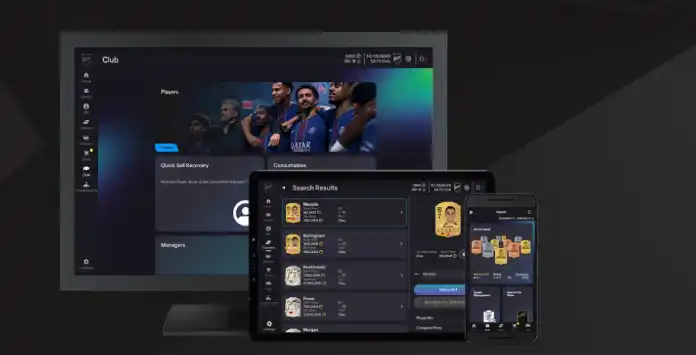
The FC 27 Companion App lets you manage your Ultimate Team club on the go from a compatible iOS or Android device. It works alongside the FC 27 Web App and the game on console or PC, keeping your Club updated wherever you play. Although you cannot play matches through the app, it provides access to most Ultimate Team club management features:
- Manage and share Ultimate Team squads, including Concept Squads;
- Search for, buy, list and sell items on the Transfer Market, if you have access;
- Purchase packs from the Ultimate Team Store;
- Complete Squad Building Challenges;
- Complete eligible Squad Management Objectives;
- Improve and customise players with Evolutions;
- Claim Squad Battles, Division Rivals and Champions rewards;
- Customise your active stadium;
- Recover eligible Player Items through Quick Sell Recovery;
- Track your progress across Ultimate Team game modes.
The Companion App cannot be used while you are logged in to Ultimate Team on your console or PC. Return to the main Football Club menu, wait a few moments if necessary, and then try signing in to the app again.
FC 27 Companion App Access
The Companion App is free to download on compatible iOS and Android devices. Eligible returning players may access their FC 27 Ultimate Team club before launch if they created an Ultimate Team Club and logged in to FC 26, FC 25 or FC 24 on their platform before August 1, 2026. Their EA Account must still be active and in good standing.
How to access the FC 27 Companion App
- Check that your device meets the requirements;
- Open the App Store or Google Play Store;
- Search for ‘EA SPORTS FC 27 Companion’;
- Download the app;
- Install the app and sign in with your EA Account.
Players who do not receive automatic access may need to earn it by playing Ultimate Team. To continue using the Web App and Companion App after November 7, 2026 at 11:59:50 pm UTC, you must log in to Ultimate Team in FC 27 on your console or PC at least once.
Transfer Market Access
Downloading the Companion App does not automatically unlock the Transfer Market. Eligible returning players may receive access automatically, while new or ineligible players must earn it by playing Ultimate Team.
New players may need to complete the following Graduated Access Objective Groups to unlock the Transfer Market inside FC 27:
- The Academy Grind;
- First Team Dreams;
- Rising Through the Ranks.
To earn access in the Web App or Companion App, an active day normally requires three complete Ultimate Team matches and a login to one of the apps during the same UTC calendar day. Accounts with no other Ultimate Team account used on the same device will normally receive access after two active days. If several Ultimate Team accounts are used on the same device, access may take at least four active days or longer.
EA does not guarantee the exact timing and cannot manually unlock the Transfer Market. An in game message will confirm when access is available.
Companion Release Date
The FC 27 Companion App became available on September 17, 2026, one day after the Web App, at approximately 6:30 pm UK time.
If you already have the FC 26 Companion App installed, the FC 27 version should be delivered as an update through the App Store or Google Play. After the update, the app will no longer support management of your FC 26 Ultimate Team club.
Regular updates will add new content, improve stability and fix bugs throughout the FC 27 season.
| Videogame | Release Date |
| FC 27 | 17/09/2026 18:30 Thu |
| FC 26 | 18/09/2025 18:30 Thu |
| FC 25 | 19/09/2024 18:30 Thu |
| FC 24 | 21/09/2023 18:30 Thu |
| FIFA 23 | 22/09/2022 18:30 Thu |
| FIFA 22 | 23/09/2021 18:45 Thu |
| FIFA 21 | 01/10/2020 19:00 Thu |
| FIFA 20 | 19/09/2019 18:00 Thu |
| FIFA 19 | 20/09/2018 19:30 Thu |
| FIFA 18 | 21/09/2017 18:00 Thu |
| FIFA 17 | 21/09/2016 18:00 Wed |
| FIFA 16 | 15/09/2015 18:00 Tue |
| FIFA 15 | 18/09/2014 20:00 Thu |
| FIFA 14 | 15/09/2013 18:00 Sun |
| FIFA 13 | 04/10/2012 18:00 Thu |
Frequently Asked Questions
The FC 27 Companion App release date is September 17, 2026 (around 7 pm UK time).
In order to access the FC 27 Companion App, you need to:
- Go to your Google or Apple store and search by ‘EA Sports FC 27 Companion’;
- Download, install and run the app;
- Log in with your EA credentials.
If the FC 26 Companion App is already installed, it should receive the FC 27 update through the App Store or Google Play. If automatic updates are disabled, you may need to update it manually.
FC 27 Companion App requires iOS 15.0 or later and Android 10.0 or later.
You can manage your club from PlayStation 5, PlayStation 4, Xbox Series X, Xbox One, PC EA App, PC Steam and PC Epic Games. The Companion App is not compatible with Nintendo Switch.
Yes. The app is free to download and use. Packs purchased from the Store may require Coins or FC Points, while earned reward packs can be opened without an additional payment.
You cannot. After the FC 27 Companion App forced update, it is no longer possible to access the FUT Companion App for FC 26. However, you can still manage your squad on the console.
Your EA Account is linked to the email address used to sign in to the Companion App. Depending on the platforms connected to your EA Account, you may have several FC personas available. Open the Settings menu and select the Persona option to switch between eligible personas. To use a different EA Account, you must sign out completely and then sign in again.
The advantage of using the Companion App is that it provides a faster and more convenient way to manage your UT club. Many traders rely on it for searching, buying, and selling cards, as these actions often require frequent, quick visits to the market throughout the day. Unlike the Web App, these tasks can be done on the go.
The FC Web App is available on web browsers while the companion app is available on iOS and Android devices. You should take your decision based on your devices and where you are. If possible, use both.
No. If you are logged in to Ultimate Team on your console or PC, you cannot access the Companion App at the same time. Return to the main Football Club menu, wait a few moments if necessary, and then try signing in to the app again.
No. If you are logged in to Ultimate Team on your console or PC, you cannot access the Companion App at the same time. Return to the main Football Club menu, wait a few moments if necessary, and then try signing in to the app again.
The Companion App is translated in 21 languages:
- Arabic
- Brazilian Portuguese
- Chinese (Traditional)
- Chinese (Simplified)
- Czech
- Danish
- Dutch
- English
- French
- German
- Italian
- Japanese
- Korean
- Norwegian
- Polish
- Portuguese
- Russian
- Spanish
- Spanish (Latin America)
- Swedish
- Turkish
To change the app language, you just need to:
- Click on the [Settings] icon;
- Click [Select Language]
Currently, FC Point purchases using the Companion App on Android are only available if you play the game on a PC. Because of some platform pricing limitations across mobile, console, and PC, this feature is not available on iOS.
Currently there isn’t currently a feature that lets you change the name of your club on the Companion App.
There are several reasons the app might not be working, such as server outages, ongoing maintenance, or issues with your device or account.
Companion App maintenances are very rare.
This security feature, which replaced the security question in FIFA 19, prevents unauthorized access to your EA Account from unrecognized devices without your password and verification method. The login verification process generates temporary numeric passcodes specifically for your account.
You will need your EA account email address and password. You may also be required to input a verification code.
We highly recommend setting up multiple ways to receive your verification code, so you always have a backup if something goes wrong. One of the best options is the authenticator app, which offers the highest level of security. It generates a 6-digit code in the Google Authenticator app that you can enter whenever needed. Just open the app and use the code shown.
How to Enable the App Authenticator
We highly recommend setting up multiple ways to receive your verification code, so you always have a backup if something goes wrong. One of the best options is the authenticator app, which offers the highest level of security. It generates a 6-digit code in the Google Authenticator app that you can enter whenever needed. Just open the app and use the code shown.
How to Enable the App Authenticator
- Go to your EA Account security settings page;
- Scroll down to [Two-Factor Authentication];
- Select [Turn On];
- Choose [Authenticator App];
- Install the Google Authenticator app for Google Play or iPhone;
- Open the Authenticator App and click [Begin Setup];
- Choose how you want to set up the authenticator:
– Choose Scan barcode to scan the QR code from your Settings
– Choose Manual entry to type in your EA Account’s email address and the Secret Key from your Settings; - Enter the code that the authenticator gives you and click [Save].
If you switch platforms, no. Returning user rewards are tied to your specific console account. So if you switch platforms or create a new account on the same platform, your access and rewards won’t carry over.
FC 27 Companion App early access is only available for FC 26 players who have entered at least once in the Web App and fulfil the following specific conditions:
- They must have created an Ultimate Teamclub in FC 26 and logged in to FC 26 on their platform before August 1, 2026;
- The FC 26 account must still exist;
- Their accounts needs to be in good standing.
Yes. You can get early access to the companion App without pre-ordering the game. However, if you don’t buy the game, the access to the app will expire on November 13.
Access to the Transfer Market is a privilege for returning players. If you’ve accessed the Transfer Market in previous FC games, you may get access right away if your UT account is in good standing. However, if you’re brand new to Ultimate Team or any action was taken against your account, you’ll need to earn access before you can use it.
A Transfer Market ban from FC 26 does not automatically carry over to FC 27. However, you may need to earn access again. A ban affecting the entire EA SPORTS FC franchise can continue to affect your account in future titles. If your account is specifically blocked in FC 27, check the email associated with your EA Account and follow EA’s appeal process where applicable.
3.7
6
votes
Article Rating
Subscribe
Login
0 Comments
Newest
Oldest
Most Voted
Inline Feedbacks
View all comments