
FC 27 DIFFICULTY LEVELS
FC 27 Difficulty Levels allow you to adjust the game to match your skill level.
Difficulty Levels
Difficulty levels determine how challenging CPU-controlled opponents are in EA Sports FC 27. Higher settings generally improve the AI’s decision-making, reactions, positioning, passing, defending and ability to create scoring opportunities.
When setting up a profile or starting certain offline modes, you may be asked to select a difficulty level. This setting can later be adjusted before a match.
FC 27 includes seven difficulty levels for matches against the CPU:
- Beginner
Designed for players with no previous EA Sports FC experience; - Amateur
A forgiving setting for players learning the basic controls; - Semi-Pro
Suitable for casual players who already understand the fundamentals; - Professional
Provides a more balanced challenge for experienced players; - World Class
Features more capable opponents with improved positioning and decision-making; - Legendary
Designed for highly experienced players looking for a demanding challenge; - Ultimate
The highest CPU difficulty, available in selected single-player modes.
The way how each difficulty level affects the performance of AI during
| Difficulty | Attacking Intelligence | Defending Intelligence | Reaction Speed | Marking and Space |
| Beginner | 10% | 10% | 20% | 15% |
| Amateur | 20% | 20% | 40% | 30% |
| Semi-Pro | 40% | 40% | 50% | 50% |
| Pro | 50% | 50% | 70% | 60% |
| World Class | 75% | 75% | 80% | 80% |
| Legendary | 90% | 90% | 90% | 90% |
| Ultimate | 100% | 90% | 100% | 100% |
Difficulty and Gameplay Presets
The selected difficulty level is not the only setting that affects matches against the CPU. FC 27 also uses Competitive and Authentic Gameplay presets, which can change the pace, responsiveness, assistance and behaviour of certain gameplay systems.
Competitive Gameplay prioritises responsiveness and greater manual control, while Authentic Gameplay is designed to provide a more realistic offline football experience. As a result, the same difficulty level may feel different depending on the selected preset, game mode and customised gameplay sliders.
How to Change the Difficulty Level in FC 27
You can adjust the difficulty level before playing most matches against CPU-controlled opponents. The selected setting affects the behaviour and overall ability of the opposing AI.
Difficulty cannot normally be changed after a match has started, so make sure you select the appropriate level before kick-off.
How to Change the Default Difficulty
- From the FC 27 main menu, open [Settings];
- Select [Game Settings];
- Go to the [Match] tab using R1/RB;
- Scroll down to [Difficulty Level];
- Use the directional buttons or left stick to select your preferred difficulty;
- Confirm the change before starting the match.
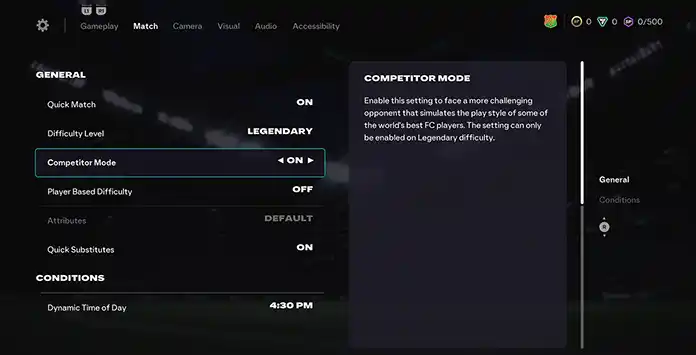
Competitor Mode
Competitor Mode makes CPU-controlled opponents more challenging by replicating some of the behaviours and play patterns used by highly skilled competitive FC players.
Introduced in FIFA 21, this optional setting changes how the CPU attacks and responds to match situations. Opponents may use more skill moves, agile dribbling, advanced passing combinations and tactical adjustments when trying to create scoring opportunities or recover from a losing position.
Competitor Mode does not replace the selected difficulty level. Instead, it modifies CPU behaviour when playing on supported higher difficulty settings.
How to Enable Competitor Mode
- From the FC 27 main menu, open [Settings];
- Select [Game Settings];
- Go to the [Match] tab using R1/RB;
- Scroll down to [Competitor Mode];
- Use the directional buttons or left stick to turn it on.
Player Based Difficulty
Player Based Difficulty makes the most talented players on a CPU-controlled team perform more effectively when they are in possession.
Introduced in FIFA 21, this optional setting applies additional differentiation between individual players rather than making every member of the opposing team perform at exactly the same level.
For example, when playing against a CPU team on Professional difficulty, its standout players may perform closer to World Class level, while less capable players may behave closer to Semi-Pro level. This helps reflect differences in individual ability within the same team.
How to Enable Player Based Difficulty
- From the FC 27 main menu, open [Settings];
- Select [Game Settings];
- Go to the [Match] tab using R1/RB;
- Scroll down to [Player Based Difficulty];
- Use the directional buttons or left stick to turn it on.
Frequently Asked Questions
There are seven FC 27 difficulty levels:
- Beginner;
- Amateur;
- Semi-Pro;
- Professional;
- World Class;
- Legendary;
- Ultimate.
If you’ve played previous titles, it’s recommended to choose the difficulty level you’re familiar with or one step below. If this is your first FIFA/FC experience, Amateur is a good starting point unless you have experience with other football simulators. In that case, Semi-Pro may be a better fit.
You can change the difficulty level before any single-player game or in the settings screen.
- From the main Ultimate Team screen, navigate to [Customize];
- Select [Settings] and then [Game Settings];
- Scroll down to [Difficulty Level];
- Use the directional pad or left analog stick to set the difficulty to your desired level.
Most players choose Professional when playing FC 27, but World Class and Semi-Pro are also very popular.
Competitor Mode allows you to face CPU AI that mimics the play styles of some of the world’s top FC Pro players.
Competitor Mode changes the behaviour of CPU-controlled opponents to reproduce some of the play patterns used by highly skilled FC players, including more skill moves, advanced dribbling and attacking combinations. It is available on Legendary and Ultimate difficulty in supported modes.
Yes, usually, it’s more challenging to play against the CPU AI than when this feature is not enabled.
They do not replace the selected difficulty level, but they can change how challenging a match feels. Gameplay pace, responsiveness, assistance, AI behaviour and customised sliders can all influence the overall experience.
Player Based Difficulty makes the best players on a CPU-controlled team perform more effectively in possession, creating greater differences between standout players and less capable teammates.
You cannot change the difficulty setting during a Divisions Rivals or Champions online match, since you are competing against another player. However, it can be adjusted in Squad Battles or Single-Player Draft.
Difficulty works differently in Squad Battles, as you are prompted to select your opponent’s difficulty after choosing your team. Each difficulty level offers a different points reward, with harder levels granting more points per match than easier ones.
| Difficulty | Match Points |
| Beginner | 1,500 |
| Amateur | 1,550 |
| Semi-Pro | 1,600 |
| Pro | 1,700 |
| World Class | 1,800 |
| Legendary | 1,900 |
| Ultimate | 2,000 |
You need to choose your difficulty when you play a single-player Draft match. The level you select will affect the number of coins you receive at the end of the game but has no effect on your campaign rewards.
No, your rewards at the end of your Draft campaign won’t be affected by your difficulty level.
You can change the difficulty level in Career Mode the same way as in other modes, through the FC Game Settings screen. For the most authentic experience, adjust the sliders on the ‘User Gameplay Customisation’ and ‘CPU Gameplay Customisation’ screens.
0
0
votes
Article Rating
Subscribe
Login
0 Comments
Newest
Oldest
Most Voted
Inline Feedbacks
View all comments