

Rewind Feature
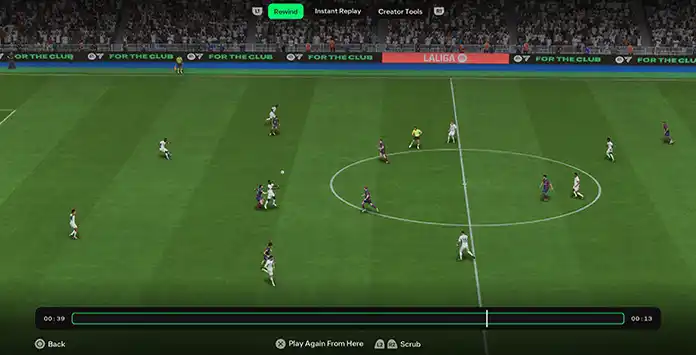
The FC 27 Rewind feature is available only in Kick-Off mode. It lets you rewind and replay moments in the game, offering a chance to practice or change the outcome of a match. Missed a clear opportunity in the box? Simply rewind to just before your shot and try again!
You can use Rewind multiple times on the same play until you get the result you want. Once you resume play from the selected point, it becomes the new timeline. You cannot undo the Rewind or return to the original sequence.
You can rewind up to approximately 30 seconds, although certain match events may prevent you from returning to a specific point on the timeline.
How to Rewind in FC 27
- While playing a Kick-Off game, pause and select [Instant Replay/Rewind];
- Select [Instant Replay];
- Press L1/LB to go to the [Rewind] tab;
- Use R2/L2 or RT/LT to select a point to rewind to;
- Once you find the desired point, press the Touch Pad/View button to start playing from that moment;
- As soon as the three-second countdown finishes, you will be able to resume play from the selected point.
Rewind Limitations
The FC 27 rewind feature lets you pause the game and revisit recent moments to replay them. However, there are a few limitations to keep in mind:
- The rewind feature is only available in Kick-Off mode.
- You cannot rewind to a previous half or after the full-time whistle has blown.
- Rewinding is not possible to a point before certain events, including injuries, substitutions, penalties, penalty shootouts, and fouls that result in a referee warning or a card.
- While the system aims to recreate the exact moment, certain animations or events may prevent a precise rewind. In these cases, the system will revert to the nearest valid moment.