
Smart Tactics for Ultimate Team
Smart Tactics let you adjust your approach in key moments without having to pause the match. The system is available across supported FC 27 modes, including Ultimate Team, and forms part of the broader FC IQ tactical system.
They make in-game strategy changes easier and more intuitive, fully integrating tactical control into live gameplay. The system offers tactical suggestions based on match dynamics, enabling quick decisions that can shift momentum. With simple D-Pad inputs and clear on-screen visuals, it helps players adapt instantly to any situation.
How to activate a FC 27 Smart Tactic?
- While playing a match, move the D-Pad once to display the Tactics Group (arrows on PC)
- Move the D-Pad again to select the action you want to activate.
- My Tactics;
- Tactical Focus;
- Quick Tactics;
- Tactical Suggestions.
My Tactics
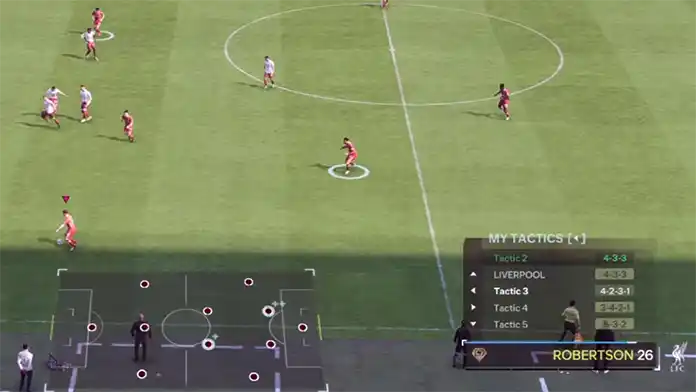
The first Smart Tactics group allows you to switch between your five saved Custom Tactics. Each tactic can use its own Formation, Defensive Approach, Build-Up Style, Player Roles and Focuses, allowing you to change the team’s complete tactical setup without pausing the match.
Pressing Left on the D-Pad opens the My Tactics menu and displays your five saved Custom Tactics, including the one currently active. Press the direction assigned to another tactic to begin the change.
As in real football, the transition takes a bit of time to complete. While players reposition, the message “Tactical Change in Progress” will appear on screen. The adjustment happens faster when the ball is out of play or during a stoppage. To reverse the change, open My Tactics again and reselect the previously active tactic.
| My Tactics |  |
| Custom Tactic 1 | /  |
| Custom Tactic 2 | / |
| Custom Tactic 3 | /  |
| Custom Tactic 4 | /  |
Tactical Focus
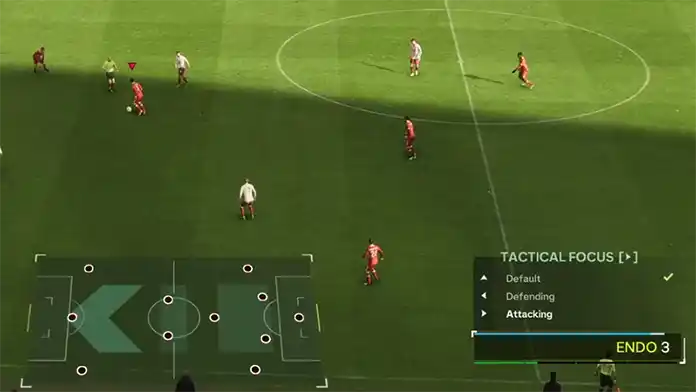
Rather than replacing the complete active tactic, Tactical Focus temporarily adjusts it towards a more attacking or defensive approach. The selected Formation and Player Roles remain unchanged, while the Build-Up Style, Defensive Approach and compatible Role Focuses are adapted to reflect the chosen mentality.
Pressing Right on the D-Pad opens the Tactical Focus menu, where you can select [Default], [Attacking] or [Defending]. [Default] restores the original settings of the active Custom Tactic, while [Attacking] and [Defending] apply temporary changes without modifying the saved tactic.
Selecting [Attacking] increases the Build-Up Style and Defensive Approach by one level. For example, Balanced Build-Up becomes Counter, while a Balanced Defensive Approach becomes High. Compatible Role Focuses also move towards a more offensive option.
Selecting [Defending] decreases the Build-Up Style and Defensive Approach by one level. For example, Balanced Build-Up becomes Short Passing, while a Balanced Defensive Approach becomes Deep. Compatible Role Focuses move towards a more defensive option.
The precise Focus adjustment depends on the Player Role and the Focuses available for that Role. Not every player follows the same progression. If a compatible more attacking or defensive Focus is unavailable, the player’s current Focus remains unchanged.
After selecting an option, the message “Focus Change in Progress” may appear until the team completes the adjustment. Players need time to reposition, although the transition can happen more quickly when the ball is out of play or during a stoppage. Selecting [Default] reverses the temporary changes and restores the original Focuses and tactical settings.
| Tactical Focus | |
| Default | , |
| Defending | , |
| Attacking | , |
Quick Tactics
Quick Tactics allow you to issue specific instructions to your team. If you’ve played previous editions of the game, you’re already familiar with how this feature works.
By pressing Up on the Directional Button, you’ll access the four available Quick Tactics:
Offside Trap
This tactic instructs the defensive line to step forward together in an attempt to catch opposing attackers offside. It takes effect immediately and cannot be manually deactivated. Poor timing can leave attackers unmarked and create a direct route towards goal.
Team Press
Activating Team Press instructs your AI-controlled teammates to apply more aggressive pressure for a limited period. It can help recover possession quickly, but it also increases Stamina consumption and may leave spaces if the opponent escapes the press.
Overload Set Pieces
This tactic sends additional players forward for attacking Free Kicks and Corner Kicks. It can be enabled at any time except while a Set Piece is already being taken. Committing more players forward may leave the team more vulnerable to counterattacks.
Get In Box
This tactic encourages additional teammates to move into and around the penalty area while your team has possession, providing more targets for crosses, cutbacks and other attacking passes.
| Quick Tactics | |
| Offside Trap | , |
| Team Press | , |
| Overload Set Pieces | , |
| Get In Box | , |
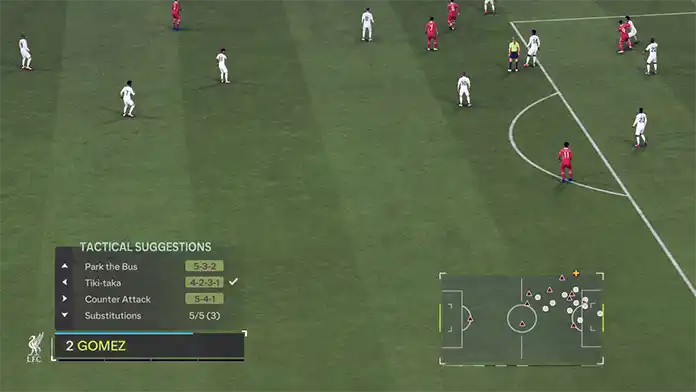
Tactical Suggestions
The real-time Tactical Suggestions system recommends changes based on the flow of the match. Pressing Down on the D-Pad opens the available suggestions and the Substitution menu.
The Substitution sub-menu will show your Suggested Subs, Custom Subs, or a mixture of both and can display up to four entries at a time.
Suggestions depend on the match situation and may include tactical approaches such as the following:
Balanced
A structured approach that aims to maintain team shape to stay strong defensively while still being able to construct attacks.
Tiki Taka
This approach demands that the entire team be comfortable on the ball, as it uses short passing and constant rotations to create space for attacks.
Long Ball
A direct approach that gets the ball forward quickly, relying on the strength and athleticism of powerful forwards to exploit space behind defenders and battle for second balls and rebounds.
Counter Attack
This approach sees the team sit back and defend the area before rapidly breaking when possession is regained.
Wing Play
This approach uses the entire width of the pitch, switching play to wide positions and overloading the flanks to create crossing opportunities.
Park the Bus
Disciplined and well-organized defending, with a compact defensive line to prevent opposition attacks.
Pressing
Your team will attempt to win back the ball quickly and high up the pitch, using fast turnovers to create goalscoring opportunities.
| Tactical Suggestions | |
| Tactic Suggestion 1 | , |
| Tactic Suggestion 2 | , |
| Tactic/Focus Suggestion | , |
| Substitution | , |