FC 27 STADIUM ITEMS
Stadium Items add an extra layer of customization in Ultimate Team.
Stadium Cards
Stadium Items and Bundles add an extra level of customization to Ultimate Team, complementing other ways to obtain Stadium Items.
You can purchase these items and bundles with Coins or FC Points during the period indicated above each Item or Bundle. Additionally, it is possible to preview a Bundle’s contents or see how Stadium Items will look in your Stadium before making a purchase.
FC 27 Stadium Items encompass various types, including Kits, Trophies, and Stadium Themes. Offered in Gold, Silver, and Bronze tiers, they are organized into five distinct categories:
Club
- Badge;
- Home Kit;
- Away Kit;
- Ball;
- Player Celebration;
- Club Anthem;
- Crowd Chant;
- Goal Song.
- Stadium Template;
- Stadium Theme;
- Stadium Colour;
- Seat Colour;
- VIP Area.
- Home End Center;
- Home End Background;
- Home End Top;
- Home End Right Corner;
- Home End Left Corner;
- Main Stand Lower;
- Main Stand VIP;
- Main Stand Upper;
- Broadcast Stand Lower;
- Broadcast Stand Upper;
- Away End Right Corner;
- Away End Left Corner;
- Top Stands.
- Goal Net Colour;
- Goal Pyrotechnics;
- Pitch Line Colour;
- Pitch Mow Pattern.
- Home End Trophy;
- Away End Trophy.
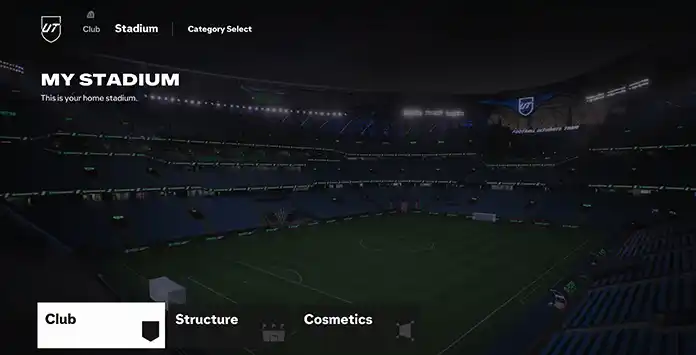
How to Customize
When you begin playing Ultimate Team and set up your club, the default UT Stadium is assigned as your starting venue. Within Ultimate Team, you can change to any available stadium in FC 27 and modify its themes and styles using the UT Stadium feature.
Stadium Items allow you to personalize your club and upgrade the appearance of your UT Stadium. Keep in mind that certain stadiums may not support every customization option.
How to Customize your Club’s Appearance
- From the main Ultimate Team screen, use R1/RB to select [Club];
- Use R1/RB again to select [Stadium];
- Make the desired changes.
How to Get Stadium Items
You can get Stadium Items in several ways, including:
- Ultimate Team Store;
- Transfer Market;
- Squad Building Challenges;
- Objectives;
- Rewards.
Frequently Asked Questions
FC 27 Stadium Items are a category of Ultimate Team cards that allows you to customize your club and your active stadium.
No, having a stadium is required in Ultimate Team, but using stadium items is optional. They are intended solely to customize the appearance of your club and stadium.
When you create your Ultimate Team club, you will receive basic stadium items to get started. These include:
- Stadium Template;
- Stadium Theme;
- Badge;
- Kit (Away and Home);
- Ball.
You can buy Stadium Items and Bundles with either Ultimate Team Coins or FC Points, depending on the Item or Bundle, following these steps:
- From the main Ultimate Team screen, select [Store];
- Scroll down to [Stadium];
- Select the Stadium Item or Bundle you want to buy.
If you want to find FC 27 stadium items on the transfer market, follow these steps:
- From the Ultimate Team main screen, select [Transfers];
- Select [Transfer Market];
- Press R1/RB twice to select the [Stadium] tab;
- Use the filter [Item Type] to select the kind of item you’re looking for;
- Search to see the results.
Locked stadium slots can be unlocked by completing specific objectives.
No, you can only buy one of each Stadium Item or Bundle from the Ultimate Team Store. After purchase, that Item or Bundle cannot be bought again.
Duplicates are still possible. You may receive the same item later, either as an individual Stadium Item or within another Bundle.
There is no limit, you can keep as many as you want.
The Stadium Items you earn are stored in your Club. To see and browse them, toggle to [Club] tab in Ultimate Team and select [Stadium].
Some FC 27 Stadium Items in the Ultimate Team Store can be traded on the Transfer Market, just like other tradeable items, while others cannot. For untradeable items and bundles, the Store menu shows an in-game icon next to the item or bundle name.
No, the Stadium Items you have in FC 27 cannot be transferred to other titles.
Your stadium is only available when your playing matches in as home games. The away matches you will be played in your opponent’s stadium.
0
0
votes
Article Rating
Subscribe
Login
0 Comments
Newest
Oldest
Most Voted
Inline Feedbacks
View all comments