
FC 27 BETA
FC 27 Beta provides an opportunity for a select group of players to test the game before it is officially released to the wider public.
FC 27 Closed Beta
Each year, EA gives players the opportunity to try the upcoming game before its official launch, allowing them to report issues and suggest improvements. While the Beta is not a full version and some new features or modes are missing, it provides a solid preview of what the final game will offer.
Access is limited to assigned modes. Everyone invited to the FC 27 Closed Beta has access to The Grounds when playing on a compatible platform. Access to other game modes may be limited, and the invitation email indicates which modes are available to each player. EA may also enable or update modes and features during the testing period. Starting August 18, all game modes will be available to every participant.
Participants are expected to provide feedback through a dedicated forum exclusive to invited players. This input helps EA Sports polish the game, resolve bugs, and enhance the overall experience. In Ultimate Team, for instance, players receive credits to buy packs, enabling testing of the in-game economy and mechanics.
Ultimate Team Glitch
Tested and working
To Unlock Ultimate Team in the Beta, follow these steps:
Requirements
- FC 27 Beta account
- A friend who does have FUT unlocked
- Both of you must be on the same platform (old gen or current gen)
- Both launch the FC 27 Beta
Your friend enters Ultimate Team
You stay on the main menu (no modes). - Friend invites you to a FUT Rush match
Invite must be sent from within the FUT menus. - Accept the invite
You’ll be taken into the lobby directly.
Once in the lobby, you can go back to the main Ultimate Team screen.
Beta Glitch
To Unlock All Modes in the Beta, follow these steps
(EA have patched this glitch on August 5, 6pm):
PlayStation
- Enter the Beta normally.
- Once in the Beta main menu, press the PlayStation button to go to the console menu.
- Go to [Settings] > [Network] > [Settings] > [Set Up Internet Connection].
- Disable your internet connection (uncheck ‘Connect to the Internet’).
- Wait a few seconds, then re-enable your internet connection (check ‘Connect to the Internet’ again).
- Return to the Beta’s main screen.
- All game modes should now be available!
- Enter the Beta normally.
- Once in the Beta main menu, press the Xbox button to open the guide.
- Go to [Settings] > [Network] > [Network Settings].
- Select ‘Go offline’ to disconnect your console from the internet.
- Wait a few seconds, then select ‘Go online’ to reconnect.
- Return to the main screen in the Beta.
- All game modes should now be available!
- Start the Beta normally
- While you are in the main screen, disconnect your PC from the internet
- If using Ethernet, unplug the network cable.
- If using Wi-Fi, turn off Wi-Fi or disable the connection.
- Wait until you see the message ‘Disconnected’ or a connection error on the main Beta screen.
- Reconnect your PC to the internet (plug the cable back in or turn Wi-Fi back on).
- Return to the main menu of the Beta.
- All game modes should now be available!
FC 27 Beta Release Date
All release times are indicated in the UK time zone.
| Release-End Date | |
| FC 27 | 05/08/2026 18:00 Wed 25/08/2026 18:00 Tue |
| FC 26 | 06/08/2025 18:00 Wed 26/08/2025 18:00 Tue |
| FC 25 | 06/08/2024 18:00 Tue 27/08/2024 18:00 Tue |
| FC 24 | 10/08/2023 18:00 Thu 31/08/2023 18:00 Thu |
| FIFA 23 | 11/08/2022 18:00 Thu 02/09/2022 23:59 Thu |
| FIFA 22 | 12/08/2021 18:00 Thu 02/09/2021 18:00 Thu |
| FIFA 21 | 14/08/2020 19:00 Fri 01/09/2020 19:00 Tue |
| FIFA 20 | 09/08/2019 17:00 Fri 21/08/2019 18:00 Wed |
| FIFA 19 | 10/08/2018 17:00 Fri 22/08/2018 18:00 Wed |
| FIFA 18 | 10/08/2017 17:00 Thu 20/08/2017 18:00 Sun |
| FIFA 17 | 18/08/2016 17:00 Thu 28/08/2016 18:00 Sun |
| FIFA 16 | 13/08/2015 17:00 Thu 23/08/2015 18:00 Sun |
| FIFA 15 | 15/08/2014 17:00 Fri 25/08/2014 18:00 Mon |
| FIFA 14 | 02/09/2013 17:00 Mon 12/09/2013 18:00 Thu |
| FIFA 13 | 12/09/2012 18:00 Wed 19/09/2012 18:00 Wed |
How to be Selected
Players are selected and invited directly by EA. You can register for EA Playtesting or opt in to EA marketing emails, but neither option guarantees access to the FC 27 Closed Beta.
Sign Up for EA Playtesting
- Go to the EA Playtesting website;
- Sign in with your EA Account;
- Complete your player profile and platform details;
- Register your interest in relevant playtests when available.
Update Your Contact Preferences
- Go to the EA website;
- Select the avatar icon and sign in to your EA Account;
- Select the avatar again and open [Account Settings];
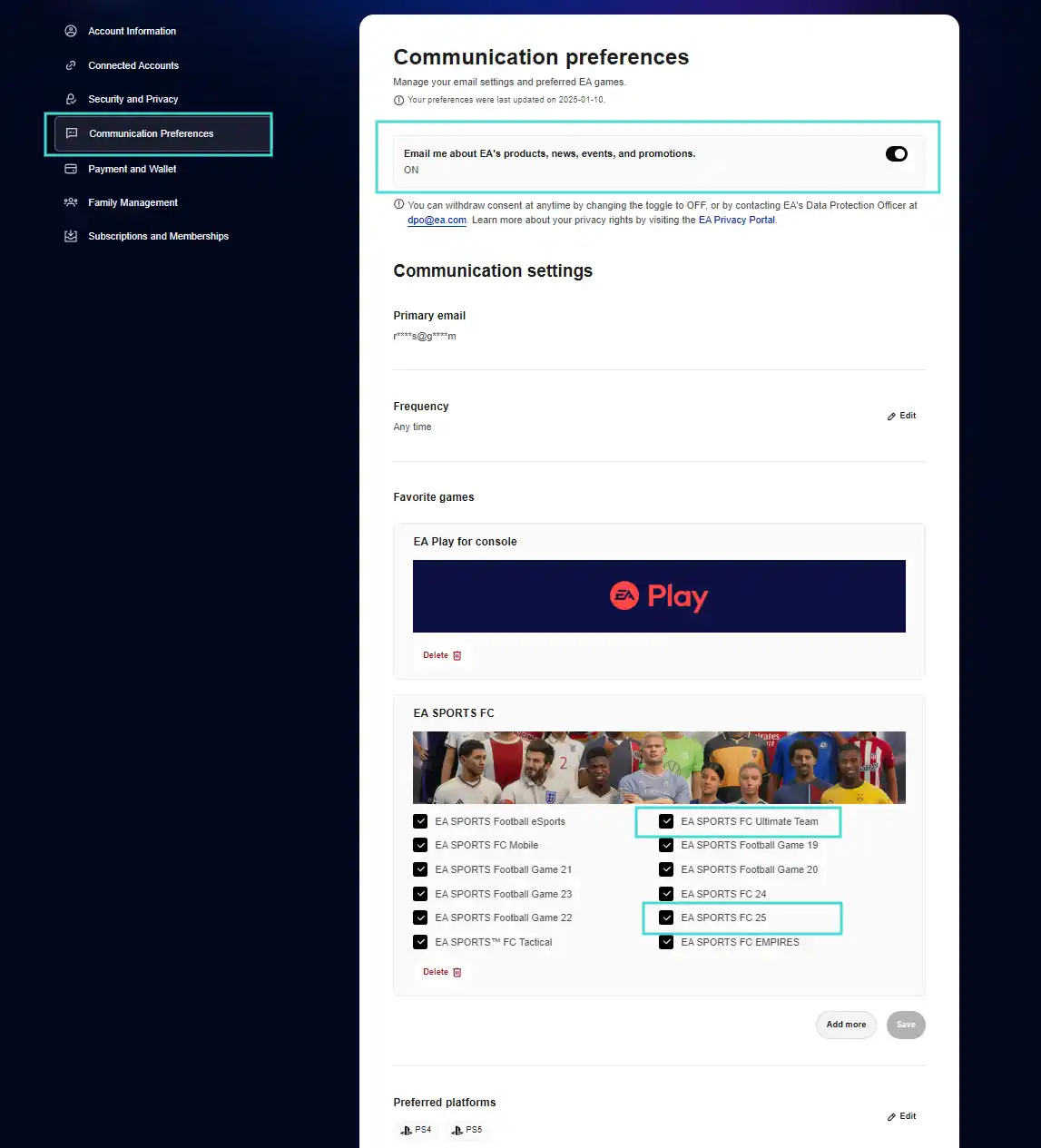
- Go to [Communication Preferences];
- Enable emails about EA products, news, events and promotions;
- Select EA SPORTS FC 27 and EA SPORTS FC Ultimate Team under [Favorite Games];
- Confirm your [Preferred Platforms];
- Select [Save].
Signing up for EA Playtesting or enabling marketing emails does not guarantee that you will receive an invitation.
FC 27 Beta Code
Selected FC players, who opted in to get EA emails, will get an email at their inbox that’s linked to their EA account. Because of limited space, not everyone will get an email which includes a FC 27 Beta code.
In order to be eligible, there are a few basic requirements you have to meet:
- You must be at least 18 years old;
- EA officially lists Canada, excluding Quebec, Ireland, the United States and the United Kingdom as the territories supported by the Closed Beta, although invited players in other countries have also been able to access it;
- You must have an EA Account and an online connection;
- You must play on PlayStation 5, PlayStation 4, Xbox Series X|S, Xbox One, Nintendo Switch, Nintendo Switch 2, or PC through Steam or the EA app;
- You must accept the EA User Agreement, EA Privacy and Cookie Policy, and Pre-Release Feedback Agreement;
- You need an active Xbox Game Pass, PlayStation Plus or Nintendo Switch Online subscription when required on your platform.
Additionally, updating your contact preferences and actively participating in the game tester program, as previously mentioned, can further increase your likelihood of selection.
Duplicate Beta Codes
Tested and working
Although each selected EA Account is normally assigned only one FC 27 Beta code, the official EA Beta Code Tool may, in some cases, generate a second working code from the original one.
The new code can be redeemed to download and launch the Beta, including on another compatible device or account. However, this does not grant full access to the Beta. Players using the duplicated code will usually remain on the [News] screen without access to any game modes.
They may temporarily enter a mode by accepting an invitation from an authorised Beta player. This access only lasts for the current session. After closing the game or ending the session, the player will return to the [News] screen and must be invited again.
To generate a second Beta code, follow these steps:
Requirements
- An original FC 27 Beta code that has never previously been duplicated;
- An account using the same platform and region as the original code.
- Go to the official EA Beta Code Tool;
- Sign in to your EA Account or continue as a guest;
- Enter the requested details, selecting [EA SPORTS FC 27], the platform and region associated with the original code;
- Enter the original Beta code that has never previously been duplicated;
- Submit the request and copy the newly generated code;
- Redeem the new code on the corresponding console or PC platform to download the FC 27 Beta.
Disclaimer
This method does not work with every code and does not permanently unlock any game modes. Each eligible original code can only be duplicated once. A code generated through this process cannot be used to create another code.
Beta codes are intended for selected participants and are subject to EA’s Closed Beta rules. Using a code on a different account does not make that account an authorised Beta participant and may conflict with EA’s restrictions on transferring or sharing Beta access.
FC 27 Closed Beta Rules
The FC 27 Closed Beta is confidential. Players are not allowed to post, stream, capture or otherwise share content from the Closed Beta gameplay or its private forums.
Breaking these rules may result in losing access to the current Beta and being excluded from future testing opportunities. Published or streamed content may also be removed, and streaming channels may receive a strike.
Beta codes are personal, linked to the invited player and cannot be transferred, sold or shared with another account.
Beta Invitation Date
All release times are indicated in the UK time zone.
| Batches | ||
| FC 27 | 04/08/2026 18:00 Tue 06/08/2026 18:00 Thu 12/08/2026 18:00 Wed | |
| FC 26 | 04/08/2025 23:30 Mon 22/08/2025 20:00 Fri | |
| FC 25 | 06/08/2024 14:30 Tue | |
| FC 24 | 09/08/2023 18:00 Wed 21/08/2023 18:00 Mon | |
| FIFA 23 | 10/08/2022 18:00 Wed 24/08/2022 18:00 Wed | |
| FIFA 22 | 11/08/2021 18:00 Wed 25/08/2021 18:00 Wed | |
| FIFA 21 | 12/08/2020 18:00 Wed 26/08/2020 18:00 Wed | |
| FIFA 20 | 08/08/2019 18:00 Thu | |
| FIFA 19 | 08/08/2018 18:00 Wed | |
| FIFA 18 | 09/08/2017 18:00 Wed | |
| FIFA 17 | 02/08/2016 18:00 Tue | |
| FIFA 16 | 27/07/2015 18:00 Mon | |
| FIFA 15 | 11/08/2014 18:00 Mon | |
| FIFA 14 | 26/08/2013 18:00 Mon | |
| FIFA 13 | 12/09/2012 18:00 Wed | |
Frequently Asked Questions
Video game developers create games through a series of distinct stages, often called alpha, beta, and release. You may also encounter terms like “limited regional launches” and “playtests” depending on the title.
During the beta stage, the game is functional and largely playable, featuring most of the content, features, and modes. The beta version might include a few playable characters, a demo mission, and some online multiplayer options.
Developers use beta tests to gather player feedback, fix bugs, and enhance connectivity before the official launch. There are two main types of beta tests:
During the beta stage, the game is functional and largely playable, featuring most of the content, features, and modes. The beta version might include a few playable characters, a demo mission, and some online multiplayer options.
Developers use beta tests to gather player feedback, fix bugs, and enhance connectivity before the official launch. There are two main types of beta tests:
- Closed Betas
restricted beta test you have to be selected to join. - Open Betas
a beta test anyone can join.
The FC 27 Closed Beta starts on August 5, 2026 at 5 p.m. UTC and ends on August 25, 2026 at 5 p.m. UTC. For Nintendo Switch and Nintendo Switch 2 players, it starts one day later.
You must be selected by EA, receive a personal Beta code through the email linked to your EA Account, redeem the code on the assigned platform and download the game. Signing up for EA Playtesting or marketing emails does not guarantee access.
If you’re chosen to participate in a closed beta, you will receive an email containing a beta code.
A beta code is a combination of letters and numbers that grants access to most closed beta tests. Learn how to redeem your beta code for your selected platform.
A beta code is a combination of letters and numbers that grants access to most closed beta tests. Learn how to redeem your beta code for your selected platform.
Only if Ultimate Team is included among the modes assigned to you. Your invitation email indicates which game modes you can access. Everyone receives access to The Grounds when using a supported platform, but access to other modes may be limited. Starting August 18, Ultimate Team and all other game modes will be available to every participant.
Your invitation email indicates which game modes you can access during the first part of the Closed Beta. Everyone can play The Grounds on a compatible platform, while access to other modes may initially be limited. Starting August 18, all game modes will be available to every participant.
Check that you redeemed the code using the EA Account and platform associated with your invitation. If you encounter an error, cannot download the Beta or need to confirm your invitation status, use EA’s Beta Access Tool. EA advisors cannot issue a Beta code if you were not selected.
Most of the times, players get stucked in the News screen because they are using the code of someone else.
Most of the times, players get stucked in the News screen because they are using the code of someone else.
The FC 27 Closed Beta is available in English. This language setting is not necessarily related to the player’s location, as invited players outside the territories officially listed by EA have also been able to access the Beta.
The FC 27 Beta download size is approximately 77 GB on some platforms, but the exact size may vary depending on your platform and any additional updates.
No. Generally speaking, the players and ratings used in the FC 27 Closed Beta are not the ones from FC 27.
No progress made on the FC 27 Beta carries over to the final game. As soon as the final version is released, everything is reset.
For players, the Beta offers the first opportunity to experience the upcoming title firsthand, but for EA, it serves a much broader purpose. FC 27 is a complex project composed of multiple game modes, some developed over several years. Different teams handle various aspects of the game, deciding what will be included in the final release based on deadlines, quality standards, and other priorities. This means some teams may not be entirely focused on the next launch.
A comprehensive testing process is essential to ensure smooth gameplay. EA typically enlists volunteers for initial playtests, using their feedback to refine the game. Once these adjustments are made, the Alpha version is released. The complete game generally launches by the end of September, followed by updates to address any post-production issues. During this process, the Beta phase provides an additional opportunity to polish the game before its official release.
A comprehensive testing process is essential to ensure smooth gameplay. EA typically enlists volunteers for initial playtests, using their feedback to refine the game. Once these adjustments are made, the Alpha version is released. The complete game generally launches by the end of September, followed by updates to address any post-production issues. During this process, the Beta phase provides an additional opportunity to polish the game before its official release.
To receive a code, you need to have been selected. Pay attention to your mailbox to see if you were invited. Only selected players can play the Beta.
Only players who were invited will be able to play the FC 27 Beta. The first FC 27 Closed Beta invitations were sent on August 4, 2026. EA may send additional invitations during the testing period, but further batches are not guaranteed. Usually, it is available to preload for beta testers 24 hours before the opening date.
Follow these simple steps:
Update Your Contact Preferences
This will inform EA that you are available to receive emails from them and eventually the FC 27 Beta invitation
Update Your Contact Preferences
This will inform EA that you are available to receive emails from them and eventually the FC 27 Beta invitation
- Go to the EA website;
- Click in the top-right avatar icon and login into your account;
- Click in the avatar again and select [Account Settings];
- Go to [Communication Preferences] and turn On ‘Email me about EA’s products, news, events, and promotions’;
- Confirm that ‘FC 27’ and ‘EA SPORTS FC Ultimate Team’ are both checked on the [Favorite Games] box (if you can’t see them, click in [Add More]);
- Check your [Preferred Platforms];
- Click on the [Save] button at the bottom of the page.
The Frequency dropdown menu is used to set the frequency of emails you’d like to receive from us.
Under Favorite Games, you can choose the games you want to hear about, then select [Save] to confirm your choices. That way you’ll only get beta information about the games you want to play.
You can also set your Preferred Platforms and then select [Save] to confirm your choices. Make sure to choose the platforms you play on. If you choose the wrong platform, you might get a beta code for a platform you don’t play on, meaning you won’t be able to join the beta test.
Under Favorite Games, you can choose the games you want to hear about, then select [Save] to confirm your choices. That way you’ll only get beta information about the games you want to play.
You can also set your Preferred Platforms and then select [Save] to confirm your choices. Make sure to choose the platforms you play on. If you choose the wrong platform, you might get a beta code for a platform you don’t play on, meaning you won’t be able to join the beta test.
There is no guaranteed way to receive a code. Registering for EA Playtesting and enabling EA marketing emails makes you available for selection, but EA chooses the participants. EA advisors cannot issue a code or confirm whether you will be invited.
Before anything else you need to be invited. The email sent to you includes a unique Beta code that you will use to download the game.
PlayStation
PlayStation
- Select the PlayStation Store icon from the home screen;
- Select [More] and then [Redeem Code];
- Select [Account Settings];
- Enter the 12-character code and start the download.
- Go to [Games] under [Store];
- Select [More] and then [Redeem Code];
- Select [Use a Code] and sign in if prompted;
- Enter the 25-character code and start the download.
- Go to ec.nintendo.com/redeem in a web browser;
- Sign in with your Nintendo Account;
- Enter your 16-character download code and click [Next];
- Follow the on-screen instructions to complete the process.
- Open the EA app and sign in to your EA Account;
- Click the [Menu] icon (≡) in the top left corner;
- Select [Redeem Code];
- Enter your product code and click [Next] to confirm.
You must receive a direct invitation to participate in the FC 27 Beta. These invitations are not available for purchase, transfer, or exchange between players. Each Beta code is generated specifically for a player and is tied to their EA account. If you encounter offers to buy Beta invitations, be cautious, as these are not legitimate. All Beta invitations are non-transferable and cannot be used with other accounts or players.
Keep a close watch on the email associated with your EA account to see if you’ve received an invitation. Ensure you check all folders, including spam. If your email has changed, update your account details to receive notifications.
EA sends all Beta-related emails from [email protected], so it’s wise to mark this as a safe sender. Additionally, be sure to check your spam, junk, or social folders for any communication from [email protected]. Always be cautious with messages from unknown senders and never share your login details with anyone.
EA sends all Beta-related emails from [email protected], so it’s wise to mark this as a safe sender. Additionally, be sure to check your spam, junk, or social folders for any communication from [email protected]. Always be cautious with messages from unknown senders and never share your login details with anyone.
When players join the FC 27 Beta, they are required to follow the closed beta agreement. This includes a confidentiality clause that prevents sharing any game details outside the dedicated feedback forum. Participants are also strictly prohibited from live streaming, recording, or distributing images or videos of the beta gameplay. Breaking these rules may lead to penalties or removal from the program.
If you violate the confidentiality terms of the beta, you’ll lose access not only to the current beta but also to any future ones. More severe cases of breach may result in stricter actions, such as copyright claims or permanent bans from participating in the game’s services. It’s crucial to adhere to the rules to maintain access and avoid potential penalties.
3
8
votes
Article Rating
Subscribe
Login
9 Comments
Newest
Oldest
Most Voted
Inline Feedbacks
View all comments