

Arena
The FC 27 Practice Arena provides players with a dedicated space to sharpen their skills and enhance key elements of their gameplay. Acting as a virtual training ground, it allows players to focus on specific techniques without the pressure of a full match. This mode is perfect for improving gameplay, testing new tactics, and building confidence before competitive play.
In the FC 27 Arena, players can practice dribbling, shooting, passing, and goalkeeping in a controlled environment. It offers the opportunity to refine various movements, techniques, and strategies to elevate overall performance. Players can also perfect corners, free kicks, and penalty shots, improving aim, power, and accuracy, all crucial for high-pressure situations.
Unlike regular matches, the FC 27 Practice Arena provides a stress-free environment, enabling players to take their time and repeat actions until mastered. This freedom to experiment makes it an invaluable tool for skill development.
The FC 27 Arena is suitable for all levels. Beginners can learn the fundamentals, while advanced players can fine-tune techniques and explore new strategies. FC 27 Practice Arena is available on the main game menu.
How to Access the Practice Arena
- From the main screen, navigate to [Learn to Play];
- Select [Practice Arena].
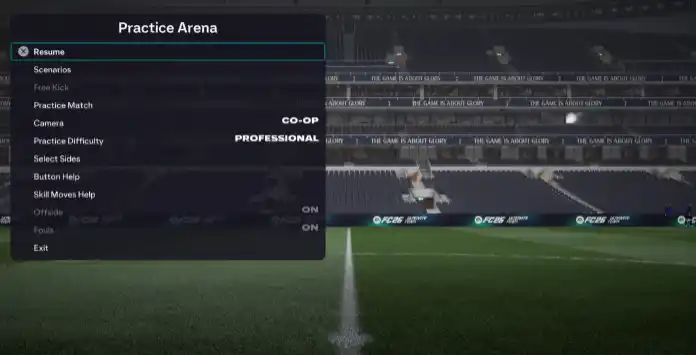
Settings
In the Practice Arena, you can take part in a variety of activities, including playing a practice match, taking free kicks (penalties and corners included), or creating specific game scenarios by choosing the number and positions of players on each team.
This mode provides immediate feedback on your actions, letting you see where your shots land, evaluate the effectiveness of your dribbling, and assess your goalkeeping performance.
To ensure you don’t miss anything, a list of Controls and Skill Moves is accessible from the pause menu. From there, you can also select your team, adjust the camera angle, and set the difficulty level.
Difficulty Levels Available:
- Beginner
- Amateur;
- Semi-Pro
- Professional
- World Class
- Legendary