FC 27 PREVIEW PACKS

FC 27 Preview Packs let you open them for free, see the contents, and choose whether to buy the packs.
FC 27 Packs

What are Preview Packs


Ultimate Team Packs are in-game virtual packs containing randomized items like players and club assets. Traditionally, their contents were unknown until opened, following the loot box model.

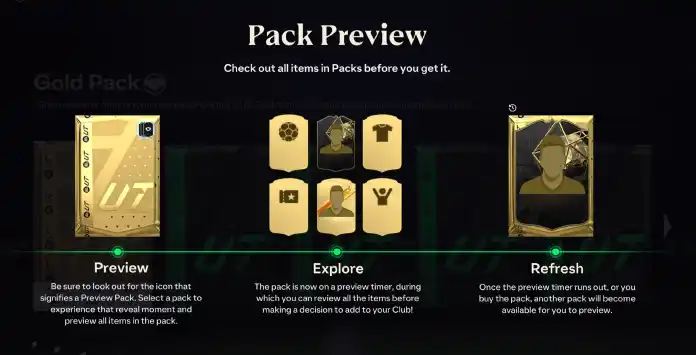
In June 2021, preview packs were introduced, letting you view the items before deciding whether to purchase the pack using FC Coins or FC Points.

After previewing, you can choose to buy the pack or skip it. Each pack is only available for a limited time, after which you can preview another of the same type or explore different pack options.

Where to Find Them


Preview Packs are available in the UT store as any other pack. You can distinguish them by the name (‘Preview Pack’ in the end) and by a small icon on the top right corner of the pack art.

Only the standard packs are available permanently in the store:
More preview packs are released throughout the year but they are only available in selected times during special UT events. In this category are included:
FC 27 Preview Packs

How to Preview Packs in FC 27


FC 27 Preview Packs let you check their contents before making a purchase. Select the ‘Preview Pack’ option in the store to see the items inside, then choose to either exit without buying or acquire the pack using your FC Coins or FC Points.

How To Open Preview Packs
  1. From the main Ultimate Team screen, navigate to [Store];
  2. Open the tab containing the available Store Packs;
  3. Look for a pack identified as a Preview Pack;
  4. Select it to reveal its contents without making a purchase;
  5. Choose whether to buy it with Coins or FC Points, or leave the preview without purchasing it.
If you purchase the pack, a new preview pack will be displayed. If you skip it, you must wait for the countdown to finish before previewing another pack.

If you leave without purchasing the pack, its revealed contents remain available until the displayed timer expires. You can return to the Store and purchase the same previewed pack at any time before that deadline.

Frequently Asked Questions
A FC 27 Preview Pack is a variant of existing Ultimate Team packs in which the player can see the content before deciding to buy it or not.
Premium Silver Preview Packs and Premium Gold Preview Packs are available in the UT store most of the time. In addition, more preview packs are released throughout the year but only at selected times.
You can preview packs only if they are labeled as previewable. Visit the FUT store and select a pack that includes ‘preview’ in its name. After viewing the contents, you can decide whether to purchase it.
No. Simply previewing a pack does not count towards your FC Playtime Pack limits. It only counts after you purchase the pack using Coins or FC Points.
The refresh time is shown on the pack in the Ultimate Team Store. Regular Preview Packs commonly use a 24-hour timer, while promotional packs may have different refresh periods or expire at the end of their availability window. Purchasing a Preview Pack usually makes another pack of the same type immediately available, provided it is still in the Store.
If the preview pack isn’t what you expected and you choose not to spend your coins or FC Points, it will stay in the store for a limited period. You must wait for the countdown to finish before previewing another pack.
Yes. Preview Packs can contain Items you already own. Any duplicate status is shown during the preview, allowing you to consider it before deciding whether to purchase the pack.
FC 27 preview packs don’t cost more than the respective regular packs. Instead, they have the same price.
No. The content is immediately shown to you when you open a preview pack. Only then can you decide to buy it or not.
Packs acquired outside the FUT Store, such as rewards from Division Rivals, Objectives, or SBCs, cannot be Preview Packs. Preview Packs are available exclusively in the Ultimate Team store.
5 1 vote
Article Rating
Subscribe
Notify of
guest
0 Comments
Newest
Oldest Most Voted
Inline Feedbacks
View all comments