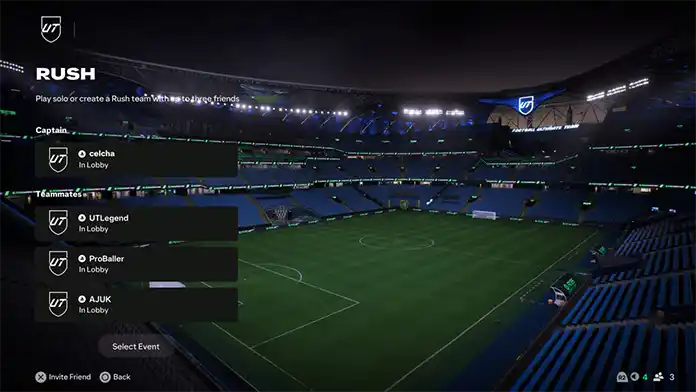
FC 27 RUSH
FC 27 Rush lets you play 5v5 matches in any core mode.
Rush Mode
Integrated in all core modes in FC 27, the 5v5 Rush experience offers a new way to play and win together. With smaller squads to build, more time on the ball, and new, custom-designed communication tools, Rush keeps you closer to the action.
How To Access FC 27 Rush
- Access the main screen from the game mode you want to play;
- Navigate to [Rush].
Playing Rush
Rush is a variant that can be played in any core mode.
Football Ultimate Team Rush
Rush offers a new way to build and play in Football Ultimate Team. Create your ideal 5-a-side squad with friends, each controlling their preferred Player Item, and compete for rewards in fast-paced 5v5 matches.
Clubs Rush
Designed to enhance the social aspect of Clubs, Rush allows you to remove AI players and compete globally alongside your teammates. Each victory earns a Victory Point for your Club and increases your individual Rush rank, bringing you closer to seasonal rewards.
5v5 Kick-Off Rush
Enjoy quick, small-sided matches in Kick-Off’s 5v5 Rush mode. Pick your favorite club or nation and face off against AI or friends locally.
Career Mode Rush
Keep track of your Youth Academy’s progress with new playable 5v5 Rush tournaments throughout the season.
Rush in Ultimate Team
Rush is a 5v5 experience featuring AI-controlled goalkeepers, allowing you to team up with up to three friends or drop in solo and get matched with others. You control your favorite player, and your team’s choices contribute towards earning Rush Points. Events
Rush events in Ultimate Team challenge players by limiting Player Items based on Rarity, Attributes, or origin. Different events offer varied progression towards weekly Rush Objectives.
Squad Building
Rush in Ultimate Team is a collaborative squad-building mode where you and your teammates select players to maximize Rush Points. You have 90 seconds to choose players based on event requirements. After selection, your team is matched with opponents, ensuring no duplicate players appear on the same team.
Earning Rush Points
Rush Points are essential for completing Weekly Objectives and earning rewards. Players earn points by winning and playing matches, especially with friends, and by completing optional challenges called blocks during squad-building phases. Blocks vary by event and provide extra Rush Points and bonuses for meeting specific requirements, encouraging teamwork and strategy to maximize points.
Rush Objectives
Each week, a Rush Objective Group allows players to earn rewards based on Rush Points collected. Participating in Rush events and completing block requirements boosts Rush Points and unlocks additional weekly (and sometimes extra) objectives for more rewards.
Matchmaking
Players can form teams of up to 4 and will be matched with others to complete the squad. Matchmaking considers individual and team skill levels and is event-specific. If a player leaves, AI takes over their role. The match ends if the entire team leaves. The goal is to build a full 5v5 team, earn Rush Points, and compete for rewards.
Matchmaking Delays
To encourage teammates to keep fighting until the end of the match, FUT Rush introduces matchmaking delays (15 minutes to 1 hour) for players who consistently quit matches early. Completing matches removes penalties.
How it Works
Team Composition and Goalkeepers
- Teams: 4 user-controlled outfield players and 1 goalkeeper.
- Disconnection: AI takes over.
- Control: Captain can control goalkeeper actions (Y/Triangle, RS/R3).
- Start: Random ball launch from halfway line adds unpredictability.
- Gameplay: Flexible roles; players self-organize and return to last location after stops.
- Clubs Rush: Team up to climb ranks and earn rewards.
- Ultimate Team Rush: Form dream teams, compete in events, earn Rush Points.
- Kick-Off Rush: Choose any team from leagues.
- Manager Career Rush: Develop youth players in 5v5 games.
- When a player pauses the game, teammates can see a Pause icon above them. If that player has the ball, teammates can request a pass, prompting the AI to deliver it.
- Four diverse Quick Chat categories, each featuring four messages for a deeper social experience.
- Pitch Size: 63.7 by 46.6 meters, encourages lateral passing.
- Match Length: 7 minutes, no half-times, extra time and shootouts for ties.
- Offside: Rules apply in the attacking third.
- Cards: Blue cards for serious fouls, 1-minute sidelining.
- Substitutions: Not available, focusing on game flow and short-term stamina only.
Frequently Asked Questions
Integrated in all core modes in EA SPORTS FC 27, the new 5v5 Rush experience offers a new way to play and win together. With smaller squads to build, more time on the ball, and new, custom-designed communication tools, Rush keeps you closer to the action.
Rush is available in all core modes, including Ultimate Team, Clubs, Kick-Off, and Career Mode.
Follow these steps to play Rush in Ultimate Team:
- From the main Ultimate Team screen press R1/RB twice and go to [Play];
- Use R1/RB again to navigate to [Competitive];
- Select [Rush];
Follow these steps to play Rush in Clubs:
Each win also provides a Victory Point, adding to your Club’s total. All Clubs are ranked on a global Clubs Rush leaderboard, and your Club’s position determines the rewards received at the end of the season.
- Go to the [Clubs] tab in the Main Menu;
- Select the [Play] tab;
- Select [Rush];
- Select [Play Rush];
- Once you’re in the lobby, select [Start Search] to get matched with teammates.
Each win also provides a Victory Point, adding to your Club’s total. All Clubs are ranked on a global Clubs Rush leaderboard, and your Club’s position determines the rewards received at the end of the season.
Follow these steps to play Rush in Clubs:
- Go to the [Manager Career] tab in the Main Menu;
- Select the [Academy] tab;
- Select the [Youth Tournament] tile;
- Select [Enter Tournament].
Follow these steps to play Rush in Clubs:
- Go to the [Kick-off] tab in the Main Menu;
- Select the [Rush] tab;
- Select the [Play].
Clubs Rush allows you to team up with clubmates or play solo to climb the ranks and improve your club’s global standing, earning seasonal rewards. Whether playing alone or with friends, teamwork is key to winning matches, increasing ranks, and collecting Victory Points.
In Football Ultimate Team, Rush complements Rivals and Champions, letting you and up to three friends create your ideal team and compete in a variety of events. Earn Rush Points by completing squad-building requirements and matches, which help you progress through weekly objectives for rewards. Optional block challenges with your team can provide extra points and bonuses.
You’ll be matched with other players based on your Match Rating, which is determined by your contributions to team efforts, not just individual achievements.
Follow these steps to invite friends to a Rush match in Ultimate Team:
- From the [Play with Friends] tab, select the plus icon;
- This will open the [Friends] tab in the EA connect layer;
- Find the friend you want to invite and select [Send Invite];
- Once you have added your friends, choose Select Event. You don’t need to fully fill your team. When you choose [Select Event], any vacant slots will be filled.
Follow these steps to invite friends to a Rush match in Clubs:
- In Clubs, select the [Play] tab, then [Rush];
- Open the EA connect menu by pressing R2/RT/Tab;
- This will open the [Friends] tab in EA connect.;
- Find the friend you want to invite and press [Send Invite].
Matchmaking delays in Rush are designed to keep matches fair. If you consistently leave online games early or disconnect, you may face time-based penalties before you can play again.
These delays start at 15 minutes and can increase up to one hour.
0
0
votes
Article Rating
Subscribe
Login
0 Comments
Newest
Oldest
Most Voted
Inline Feedbacks
View all comments