FC 27 STADIUM ITEMS

Stadium Items add an extra layer of customization in Ultimate Team.
FC 27 Stadium Items

Stadium Cards


Stadium Items and Bundles add an extra level of customization to Ultimate Team, complementing other ways to obtain Stadium Items.

You can purchase these items and bundles with Coins or FC Points during the period indicated above each Item or Bundle. When a preview option is available, you can inspect a Bundle’s contents or see how selected Stadium Items may look before completing the purchase.

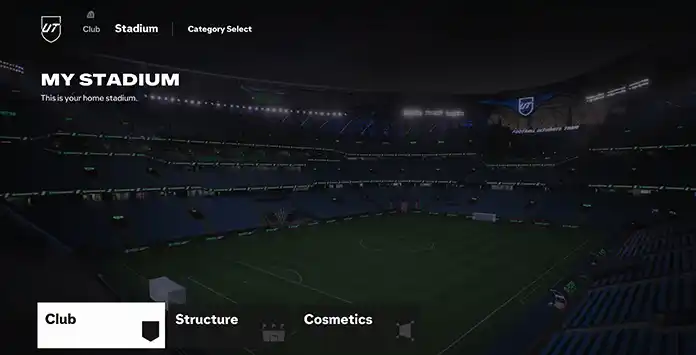
FC 27 Stadium Items encompass various types, including Kits, Trophies, and Stadium Themes. They are organized into three distinct categories:

Club
  • Badge;
  • Home Kit;
  • Away Kit;
  • Ball;
  • Player Celebration;
  • Club Nickname;
  • Club Anthem;
  • Crowd Chant;
  • Goal Sound.
Structure
  • Stadium Template;
  • Stadium Theme;
  • Stadium Base Colour;
  • Stadium Seat Colour;
  • VIP Area;
  • Goal Net Colour;
  • Goal Pyrotechnics;
  • Pitch Line Colour;
  • Pitch Mow Pattern.
Cosmetics
  • Home End Center;
  • Home End Background;
  • Stadium Dressing;
  • Main Stand VIP;
  • Pitch Trophy;
  • XL Tifo;
  • Tifo;
  • Animated Tifo;
  • Goal Net Colour;
  • Two Stick Banner;
  • Flame Cannons;
  • Confetti Cannons;
  • Sparklers;
  • Fireworks.
Trophy Items can be displayed in compatible stadium slots, including the Home End Trophy and Away End Trophy areas.
Stadium Cards

How to Customize


When you begin playing Ultimate Team and set up your club, the default UT Stadium is assigned as your starting venue. Within Ultimate Team, you can change to any available stadium in FC 27 and modify its themes and styles using the UT Stadium feature.

Stadium Items allow you to personalize your club and upgrade the appearance of your UT Stadium. Keep in mind that certain stadiums may not support every customization option.

How to Customize your Club’s Stadium
  1. From the main Ultimate Team screen, press R1/RB until you reach the [Club] tab;
  2. Select [Stadium];
  3. Choose [Club], [Structure], or [Cosmetics];
  4. Select the element you want to customize;
  5. Choose an available Item and make it active.
To modify an item, activate or deactivate it, or assign a new one, first select the item you want to customize. The system will then display all available cards in your club for that item. From there, choose the items you wish to activate and proceed with further actions. You can also perform a manual search for each item if needed.

How to Get Stadium Items


Stadium Items can have different qualities and acquisition methods. Some use traditional Bronze, Silver or Gold classifications, while others are released as themed cosmetics, seasonal rewards or Store Bundle content. You can get Stadium Items in several ways, including:

  • Ultimate Team Store;
  • Transfer Market;
  • Squad Building Challenges;
  • Season Levels;
  • Objectives;
  • Rewards.
The available acquisition methods vary according to the Stadium Item type.
Frequently Asked Questions
FC 27 Stadium Items are a category of Ultimate Team cards that allows you to customize your club and your active stadium.
No, having a stadium is required in Ultimate Team, but using stadium items is optional. They are intended solely to customize the appearance of your club and stadium.

When you create your Ultimate Team club, you will receive basic stadium items to get started. These include:

  • Stadium Template;
  • Stadium Theme;
  • Badge;
  • Kit (Away and Home);
  • Ball.
You can buy Stadium Items and Bundles with either Ultimate Team Coins or FC Points, depending on the Item or Bundle, following these steps:

  1. From the main Ultimate Team screen, select [Store];
  2. Scroll down to [Stadium];
  3. Select the Stadium Item or Bundle you want to buy.
If you want to find FC 27 stadium items on the transfer market, follow these steps:

  1. From the Ultimate Team main screen, select [Transfers];
  2. Select [Transfer Market];
  3. Press R1/RB twice to select the [Stadium] tab;
  4. Use the filter [Item Type] to select the kind of item you’re looking for;
  5. Search to see the results.
Yes. You may receive an Item that you already own, but identical Stadium Items cannot normally be stored as separate copies in your Club. A duplicate must be sold, transferred when eligible, Quick Sold or otherwise resolved before you can continue managing new Items.
You can store a large collection of different Stadium Items in your Club. However, you cannot normally keep multiple identical copies of the same Item, as additional copies are treated as duplicates.
The Stadium Items you earn are stored in your Club. To see and browse them, toggle to [Club] tab in Ultimate Team and select [Stadium].
Some Stadium Items are tradeable and can be bought or sold on the Transfer Market, while others are untradeable. Items and Bundles purchased directly from the Ultimate Team Store may be untradeable, so always check the corresponding icon and purchase information before confirming the transaction.
No, the Stadium Items you have in FC 27 cannot be transferred to other titles.
Your selected stadium is normally used when you are designated as the home team. In away matches, the game may use your opponent’s active stadium or a venue determined by the competition.
0 0 votes
Article Rating
Subscribe
Notify of
guest
0 Comments
Newest
Oldest Most Voted
Inline Feedbacks
View all comments