
FC 27 WEB APP
FC 27 Web App lets you manage your Ultimate Team club linked to a supported console or PC platform directly from a web browser.
FC 27 Web App
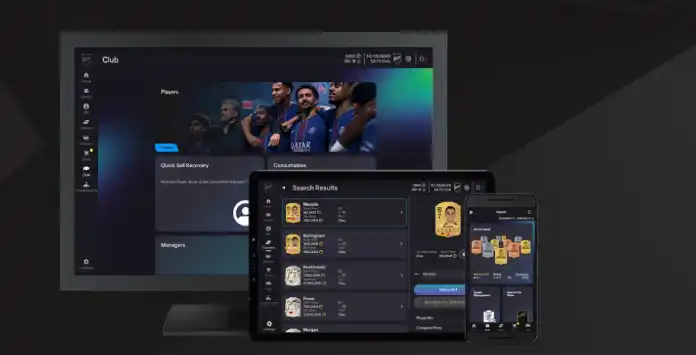
The FC 27 Web App is an online tool that lets you manage your Ultimate Team club directly from a web browser. While you can’t play matches, nearly everything else is at your fingertips:
- Manage and share UT squads, including Concept Squads;
- Search, buy, sell and trade items on the Transfer Market;
- Purchase Packs and FC Points from the Store;
- Complete Squad Building Challenges;
- Track Objectives and claim completed rewards;
- Claim Squad Battles, Rivals and Champions rewards;
- Check leaderboards;
- Customise your club and stadium.
You cannot use the FC 27 Web App while you are logged into Ultimate Team on your console or PC. Exit Ultimate Team and return to the FC 27 Main Menu before signing in to the Web App.
FC 27 Web App Access
The FC 27 Web App is a browser based platform that allows eligible players to manage their Ultimate Team club before launching the full game. The FC 27 Web App went online on September 16, 2026, while the Companion App became available on September 17, 2026.
How to access the FC 27 Web App
- Open https://www.ea.com/ea-sports-fc/ultimate-team/web-app/ in a supported web browser;
- Sign in with the EA Account used to play FC 27;
- Wait for your Ultimate Team club and squad to load.
Eligibility is based on the most recent FC title you played. To receive early access to the Web App and Companion App, you must meet the following requirements:
- You logged in to Ultimate Team and created an Ultimate Team club in FC 26, FC 25 or FC 24 on your platform before August 1, 2026;
- Your previous Ultimate Team club still exists;
- Your EA Account is in good standing and has not been banned or subject to other enforcement action.
Players who do not own FC 27 must log in to Ultimate Team on their PC or console at least once to continue using the Web App and Companion App after November 7, 2026, at 11:59:50 PM UTC.
Transfer Market Access
Transfer Market access on the Web and Companion Apps is not granted automatically to every account. Returning players may receive access if they previously unlocked the Transfer Market in FC 26, FC 25 or FC 24 before the relevant eligibility date and their EA Account remains in good standing.
Players without automatic Web App or Companion App access must earn it by playing Ultimate Team in FC 27. Previous access in an earlier game does not guarantee immediate access in FC 27.
New players may also need to complete the Graduated Access Objective Groups to unlock the Transfer Market and Champions inside FC 27. These objectives are separate from Web App and Companion App access. Completing them does not automatically unlock the Transfer Market in the Web or Companion Apps.
How to Unlock the FC 27 Transfer Market on the Web and Companion Apps
- Play three complete Ultimate Team matches in one calendar day;
- Log in to the Web App or Companion App on the same day, using UTC time;
- Repeat this process on the required number of active days;
- Wait for the in-game message confirming that Transfer Market access has been unlocked.
An account in good standing with no other Ultimate Team account used on the same device will normally receive access after two active days. If other Ultimate Team accounts have been created or used on the device, access will normally take at least four active days and may take longer depending on the number of accounts.
The exact timing is not guaranteed. It depends on factors including the account’s history, whether the FC rules have been broken, the number of Ultimate Team accounts used on the device and the number of active days completed.
When access is granted, EA sends a message to the Ultimate Team account. You can also check the Web App or Companion App to confirm whether the Transfer Market has been unlocked.
Web Release Date
The FC 27 Web App launches on September 16, 2026, at 6:00 pm UK time.
The FC 26 Web App went offline for maintenance on September 11, 2026. From the launch date onward, the Web App will only support UT 27 squad management. Anyone wishing to manage their UT 26 squad must do so on their console.
| Video Game | Announcement | Release |
|---|---|---|
| FC 27 | 11/09/2026 17:00 Fri | 16/09/2026 18:00 Wed |
| FC 26 | 12/09/2025 17:00 Fri | 17/09/2025 18:00 Wed |
| FC 25 | 16/09/2024 17:00 Mon | 18/09/2024 17:50 Wed |
| FC 24 | 15/09/2023 17:00 Fri | 20/09/2023 18:00 Wed |
| FIFA 23 | 15/09/2022 18:00 Thu | 21/09/2022 18:45 Wed |
| FIFA 22 | 16/09/2021 17:30 Thu | 22/09/2021 19:00 Wed |
| FIFA 21 | 01/10/2020 18:00 Thu | 30/09/2020 17:45 Wed |
| FIFA 20 | 18/09/2019 18:00 Wed | 18/09/2019 18:00 Wed |
| FIFA 19 | 14/09/2018 18:00 Fri | 19/09/2018 21:30 Wed |
| FIFA 18 | 09/09/2017 18:00 Sat | 20/09/2017 18:00 Wed |
| FIFA 17 | Not applicable | 20/09/2016 18:45 Tue |
| FIFA 16 | 17/09/2015 18:00 Thu | 15/09/2015 18:00 Tue |
| FIFA 15 | 17/09/2014 22:00 Wed | 18/09/2014 20:00 Thu |
| FIFA 14 | 15/09/2013 18:00 Sun | 13/09/2013 18:00 Fri |
| FIFA 13 | 18/09/2012 18:00 Tue | 20/09/2012 18:00 Thu |
| FIFA 12 | Not applicable | 20/09/2011 17:00 Tue |
| FIFA 11 | Not applicable | 13/09/2010 17:00 Mon |
| FIFA 10 | Not applicable | Unknown |
| All times are shown in UK time | ||
Frequently Asked Questions
The FC 27 Web App release date is September 16, 2026, at 6 pm UK time.
In order to access the FC 27 Web App, you need to:
- Open a web browser and type the following URL in the address bar: https://www.ea.com/ea-sports-fc/ultimate-team/web-app/
- Double-check if login verification is turned on;
- Sign in with the credentials of the EA Account linked to your Ultimate Team club;;
- Accept the user agreement.
It happens automatically. The FC 26 app will be temporarily taken down for maintenance a few days before the release date of the FC 27 Web App.
The Web App supports Ultimate Team clubs linked to PlayStation 5, PlayStation 4, Xbox Series X|S, Xbox One, EA app, Steam and Epic Games Store accounts. It does not support Nintendo Switch or Nintendo Switch 2 Ultimate Team clubs.
Yes. All you need is a PC with an internet connection. Keep in mind that opening packs through the app requires FC Points or coins.
No. Once the Web App is updated for FC 27, the FC 26 version is no longer available. You can continue managing your FC 26 Ultimate Team club from the game itself while its online services remain available.
If your EA Account is linked to more than one eligible platform account, open [Settings] and select [Change] on the top right corner. You can then choose the Ultimate Team club/platform you want to manage.
The UT Web App offers speed and convenience for managing your UT club. Many traders rely on it to search, buy, and sell cards, as these actions require frequent and quick access to the market throughout the day.
The FC Web App is available on web browsers while companion app is available on iOS and Android devices. You should take your decision based on your devices and where you are. If possible, use both.
No, the Web App cannot be accessed while logged into FC 27 on a console or PC. To use it, sign out of your UT account on the console or PC by returning to the main FC menu, then log in to the Web App. Simply turning off the console or PC while in UT does not properly log you out, and you may need to wait a few minutes before accessing the Web App.
The UT Web App is translated in 21 languages:
- Arabic
- Brazilian Portuguese
- Chinese (Traditional)
- Chinese (Simplified)
- Czech
- Danish
- Dutch
- English
- French
- German
- Italian
- Japanese
- Korean
- Norwegian
- Polish
- Portuguese
- Russian
- Spanish
- Spanish (Latin America)
- Swedish
- Turkish
To change the app language, you just need to:
- Click on the [Settings] icon;
- Click [Select Language]
If FC Points purchases are available for your platform:
- Sign in to the FC 27 Web App;
- Select the plus symbol beside your current FC Points balance;
- Choose an available FC Points bundle;
- Complete the purchase using the payment process displayed for your platform.
There isn’t a specific feature that lets you change the name of your UT club in the web app. However, you can do it on your console by going to [Settings] > [Rename].
There are many reasons why the app may not be working, including the servers being down, maintenance or something wrong with your browser/account. If you don’t know how to fix it, we strongly recommend you follow our troubleshooting guide.
Web App maintenance is infrequent, but the service may become temporarily unavailable during scheduled Ultimate Team maintenance, major content launches or the annual transition to the new game.
This security feature, which replaced the security question from FIFA 19, prevents unauthorized logins to your EA Account from unrecognized devices without your password and verification method. The login verification process generates temporary numeric passcodes unique to you.
You will need your EA account email and password, and you may also be asked to enter a verification code.
It is strongly recommended to set up multiple methods for receiving your verification code, ensuring a backup if one fails. One of the most secure options is the authenticator app, which generates a 6-digit code in the Google Authenticator app that you can enter whenever required. Simply open the app and use the code displayed.
How to Enable the App Authenticator
It is strongly recommended to set up multiple methods for receiving your verification code, ensuring a backup if one fails. One of the most secure options is the authenticator app, which generates a 6-digit code in the Google Authenticator app that you can enter whenever required. Simply open the app and use the code displayed.
How to Enable the App Authenticator
- Open your EA Account Security settings;
- Find [Two-Factor Authentication] and select [Turn On];
- Choose [Authenticator App] as your verification method;
- Scan the displayed QR code using a compatible authenticator app, or enter the setup key manually;
- Enter the generated verification code to complete the setup;
- Save your backup codes in a secure location.
Your Ultimate Team club is linked to its platform ecosystem. Moving between different ecosystems does not transfer your club, progress, items or returning-user rewards. Dual Entitlement upgrades within the same PlayStation or Xbox ecosystem are treated differently.
Early access to the Web and Companion Apps depends on your activity in recent titles. To qualify, ensure you meet the following requirements:
- Prior Activity: You created an Ultimate Team club in FC 26, FC 25, or FC 24 before August 1, 2026.
- Active Club: Your previous Ultimate Team club is still intact and active.
- Clean Standing: Your EA Account is in good standing without any bans or penalty actions.
Yes. You can get early access to the web App without pre-ordering the game. However, if you don’t buy the game, the access to the app will expire on November 07, 2026.
Returning players may receive automatic Transfer Market access if they previously earned access in FC 26, FC 25 or FC 24 before the relevant eligibility date and their EA Account remains in good standing.
Players without automatic access must earn it by playing Ultimate Team in FC 27. An active day requires playing three complete Ultimate Team matches and logging in to the Web App or Companion App on the same calendar day, according to UTC time.
Accounts with no other Ultimate Team accounts used on the same device will normally unlock access after two active days. If other Ultimate Team accounts have been created or used on the device, access will normally take at least four active days. The exact timing is not guaranteed.
Players without automatic access must earn it by playing Ultimate Team in FC 27. An active day requires playing three complete Ultimate Team matches and logging in to the Web App or Companion App on the same calendar day, according to UTC time.
Accounts with no other Ultimate Team accounts used on the same device will normally unlock access after two active days. If other Ultimate Team accounts have been created or used on the device, access will normally take at least four active days. The exact timing is not guaranteed.
It depends on the type and scope of the sanction applied to your account. A title-specific Transfer Market ban may end with FC 26, while broader account sanctions can continue to affect future titles. Previous access is not guaranteed, and you may need to unlock the FC 27 Transfer Market again.
5
1
vote
Article Rating
Subscribe
Login
0 Comments
Newest
Oldest
Most Voted
Inline Feedbacks
View all comments