
Transfer Hub
The Transfer Market is a virtual auction-based marketplace where users can buy and sell tradeable UT items of the following categories:
- Players;
- Consumables;
- Staff;
- Stadium.
The Transfers Hub includes three areas where you can do different things:
- Transfer Market
Search, bid and buy new items; - Transfer List
List your items to be sold and track the progress of the bids; - Transfer Targets
Track items you are watching or bidding on, monitor competing bids, and complete successful purchases.

How to Sell in the Transfer Market
You can sell any tradeable item in your Club. Before listing it, use [Compare Price] to review similar items and choose a competitive price. Set the Starting Price, Buy Now Price, and listing duration. The item will be sold immediately if another player uses Buy Now, or to the highest bidder when the auction ends. If no valid bid is placed, the listing will expire and the item will return to your Transfer List.
How to List an Item in the UT Transfer Market
- Select any tradeable item you own and press Square/X to pop-up the ‘Actions’ screen;
- Select [List on Transfer Market];
- Go back to the main UT screen and navigate to [Transfers];
- Select [Transfer List];
- Select the item you sent to the transfer list;
- Set a starting price, BIN and duration;
- Select [List on Transfer Market].
Eligible Player Items can remain recorded in your FUT Gallery even after being sold on the Transfer Market. These records may continue to contribute to Gallery Sets and your overall Gallery progression.
Selling Options
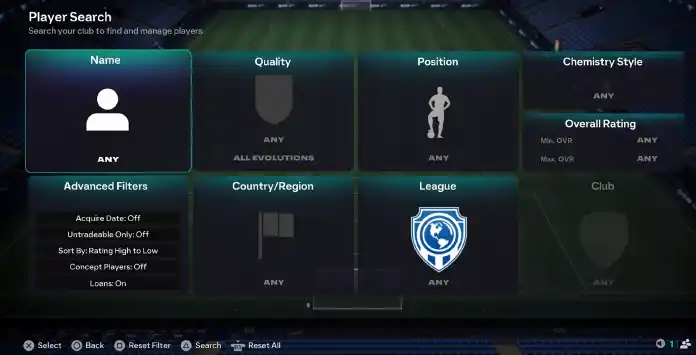
To list an item on the FC 27 transfer market, you need to set the following option for your card:
- Starting Price
The minimum amount required to place the first bid. Depending on your item and respective price range, this price can be set from 200 to 5,000,000 coins; - Buy Now Price
The price is set to give the buyer an option to buy your item immediately without bidding by paying the highest price you set; - Duration
The duration of your listing. After this duration, your item will be removed from the market if it’s not sold. You can set for 1 hour, 3 hours, 6 hours, 12 hours, 1 day or 3 days.
To reach the FUT transfer market from the main Ultimate Team menu, go to [Transfers] and select [Transfer Market].
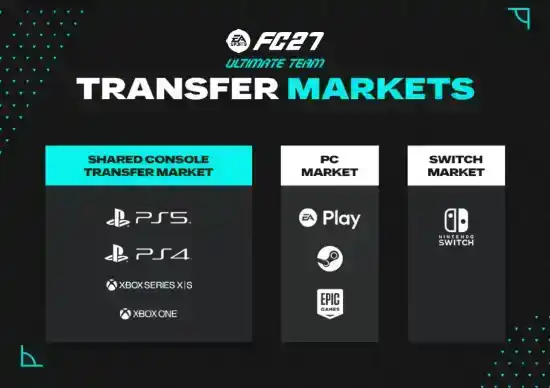
No. Starting in FUT 23, platforms share the transfer market on the following way:

- Market 1
PlayStation 5, PlayStation 4, Xbox Series X|S, Xbox One; - Market 2
PC; - Market 3
Nintendo Switch, Nintendo Switch 2.
If you want to purchase an item, follow these steps:
- From the main Ultimate Team menu, go to [Transfers] and select [Transfer Market];
- Browse through the available categories: players, consumables, stadium, and staff;
- Use the search filters to refine your results;
- Choose an item from the “Live Search Results” screen;
- Place a bid or select [Buy Now] to secure the item instantly.
If you want to list an item, follow these steps:
- Choose any tradeable item you own, open the “Actions” menu, and select [List on Transfer Market];
- Return to the main Ultimate Team menu, then go to [Transfers] followed by [Transfer List];
- Select the item you moved to the transfer list and set the starting price, BIN (Buy It Now), and duration;
- Confirm by selecting [List on Transfer Market].
Yes. EA applies a 5% tax on every completed transaction, which is paid by the seller.
Yes. The FC 27 transfer hub includes a “Transfer Targets” section where you can add cards. From there, you can monitor the auctions for those items.
ccess depends on whether you are a returning player, a new player, and whether you mean the in game Transfer Market or the Web and Companion Apps.
Eligible returning players may receive automatic access when FC 27 launches if they previously unlocked the Transfer Market in FC 26, FC 25 or FC 24 before the relevant eligibility date, and their EA Account remains in good standing.
New players must first complete the Graduated Access Objective Groups on console or PC. Complete The Academy Grind, followed by First Team Dreams, and then Rising Through the Ranks. Completing the final group unlocks access to the in game Transfer Market and Champions, although access may take up to 24 hours on consoles and 48 hours on PC.
These objectives do not automatically unlock the Transfer Market in the Web App or Companion App. If you do not receive automatic access to those apps, you must play three complete Ultimate Team matches and log in to the Web App or Companion App on the same UTC calendar day. This counts as one active day. Accounts with no other Ultimate Team account used on the same device will normally gain access after two active days. If multiple Ultimate Team accounts have been used on the device, access normally takes at least four active days and may take longer.
If your account has been specifically blocked for breaking the rules, completing objectives will not restore Web App or Companion App access. In that situation, check the email linked to your EA Account and follow EA’s appeal process where applicable.
Eligible returning players may receive automatic access when FC 27 launches if they previously unlocked the Transfer Market in FC 26, FC 25 or FC 24 before the relevant eligibility date, and their EA Account remains in good standing.
New players must first complete the Graduated Access Objective Groups on console or PC. Complete The Academy Grind, followed by First Team Dreams, and then Rising Through the Ranks. Completing the final group unlocks access to the in game Transfer Market and Champions, although access may take up to 24 hours on consoles and 48 hours on PC.
These objectives do not automatically unlock the Transfer Market in the Web App or Companion App. If you do not receive automatic access to those apps, you must play three complete Ultimate Team matches and log in to the Web App or Companion App on the same UTC calendar day. This counts as one active day. Accounts with no other Ultimate Team account used on the same device will normally gain access after two active days. If multiple Ultimate Team accounts have been used on the device, access normally takes at least four active days and may take longer.
If your account has been specifically blocked for breaking the rules, completing objectives will not restore Web App or Companion App access. In that situation, check the email linked to your EA Account and follow EA’s appeal process where applicable.
If the transfer market is locked, it is likely because you did not play FC 26 on the same platform or with the same account linked to the Web App.
Your Transfer Market may also be locked because you have not yet earned access on the Web or Companion App, your account is still being evaluated, or EA has restricted it for breaking the EA SPORTS FC rules.
The time required depends on your account history, whether the account is in good standing, the number of Ultimate Team accounts used on the same device, and the number of active days completed. EA will send an in-game message when Web and Companion App access has been unlocked.
A restriction affecting only the Web and Companion Apps does not necessarily prevent access to the in-game Transfer Market. Check the message displayed and the email associated with your EA Account for details.
Your Transfer Market may also be locked because you have not yet earned access on the Web or Companion App, your account is still being evaluated, or EA has restricted it for breaking the EA SPORTS FC rules.
The time required depends on your account history, whether the account is in good standing, the number of Ultimate Team accounts used on the same device, and the number of active days completed. EA will send an in-game message when Web and Companion App access has been unlocked.
A restriction affecting only the Web and Companion Apps does not necessarily prevent access to the in-game Transfer Market. Check the message displayed and the email associated with your EA Account for details.