

Dedicated Settings
In Football Club 27 settings, you can adjust multiple aspects of the game, including cameras, rules, audio, and gameplay assistance. The Ultimate Team mode also features its own settings, allowing you to optimize matchmaking and rename your team, as well as access Playtime feature.
How to Access the Ultimate Team Settings
- From the main FC 27 screen, navigate to [Ultimate Team];
- Use R1/RB to select [Settings];
- Use R1/RB swap between [Game Settings], [Matchmaking] and [Rename Club].
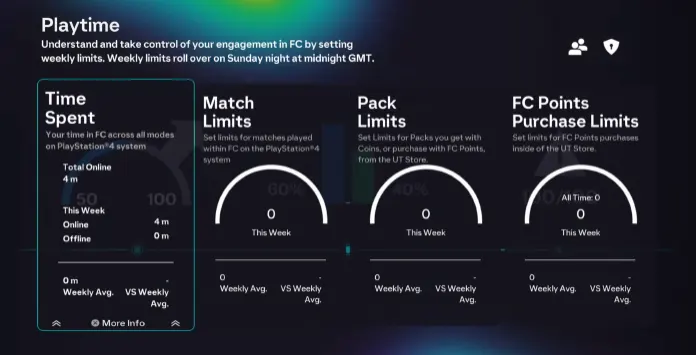
Playtime
FC 27 Playtime is a set of tools that helps you monitor your gaming activity and set personal reminders for matches, Ultimate Team Packs, and FC Points purchases.
You can review your time spent in Football Club 27, the number of matches played across all game modes, the FC Points purchased, and the Ultimate Team Packs opened with Coins or FC Points.
If you want to know more about the Playtime feature, please visit our dedicated page.
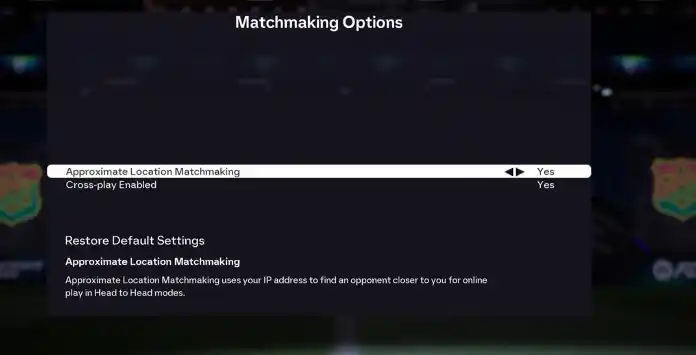
Matchmaking Settings
Ultimate Team matchmaking settings allow you to control whether the game prioritises nearby opponents and whether eligible cross-play opponents are included in your searches.
These options can affect the size of the available matchmaking pool and, depending on your location, the time required to find an opponent.
Approximate Location Matchmaking
Yes / No
When enabled, this setting uses your approximate location to search for nearby opponents. This may help improve connection quality, although it can also reduce the available matchmaking pool and increase search times in some regions.
Cross-play Enabled
Yes / No
When enabled, eligible players from compatible platforms can be included in matchmaking. Disabling cross-play limits searches to players using the same platform.

Rename Club
You can change your club name as many times as you like. To do so, simply go to Ultimate Team Settings and select [Rename Club].
If you need ideas for good and original names, don’t forget to check our suggestions. Choose a name up to 15 characters long and make sure it complies with EA’s naming rules and is not flagged as offensive or inappropriate; otherwise, you’ll need to pick a different one. Along with the club name, you can also decide whether to keep the same abbreviation or change the three-letter code displayed next to your score.
How to Change Club Name in FC 27
- From the main Ultimate Team screen, use R1/RB to go to [Settings];
- Use R1/RB again to select [Rename Club];
- Press X/A;
- Type the new team name;
- Type the new abbreviation;
- Review the club name and abbreviation, returning to the previous step if you want to make any changes;
- Confirm the changes.